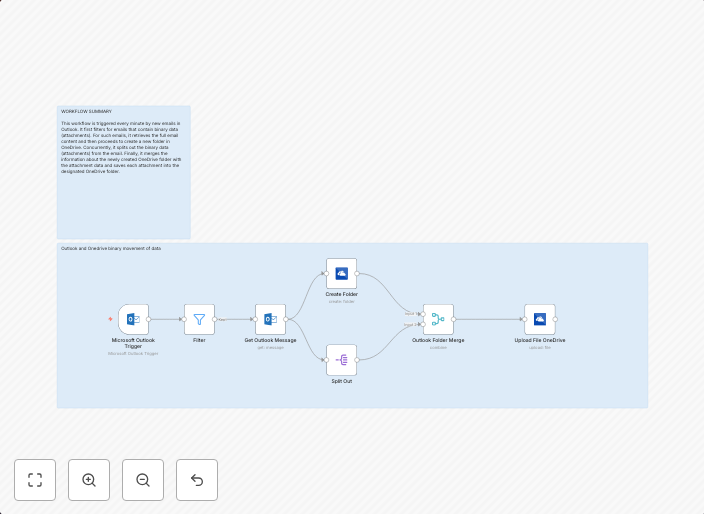
Automatically save & organize Outlook email attachments in OneDrive folders
Outlook to OneDriveThis workflow automates the process of saving binary attachments from Outlook emails into newly created folders in OneDrive. It's ideal...
Get This WorkflowAbout This Workflow
What This Workflow Does
This n8n automation workflow saves and organizes binary attachments from Outlook emails into newly created folders in OneDrive. It streamlines the process of managing email attachments by automatically storing them in a structured and easily accessible location. The workflow allows users to keep their email attachments separate from their inbox and easily accessible for future reference.
Who Should Use This
This workflow is ideal for users who frequently receive attachments via email and need to store them in a centralized location for easy access and organization. This includes professionals, businesses, and individuals who rely heavily on email communication and require efficient asset management.
Key Features
- Saves binary attachments from Outlook emails
- Creates new folders in OneDrive to store attachments
- Organizes attachments into specific folders based on criteria (e.g., email subject, sender, or recipient)
- Allows for easy access and management of email attachments
How to Get Started
To use this workflow, import it into your n8n instance and configure the Outlook and OneDrive integrations according to your needs. Customize the workflow settings to suit your specific requirements, such as adjusting the folder creation criteria and attachment storage locations.
Use This Workflow in n8n →Similar Workflows




Affiliate Disclosure: We may earn a commission if you sign up for n8n through our links. This doesn't affect our recommendations.