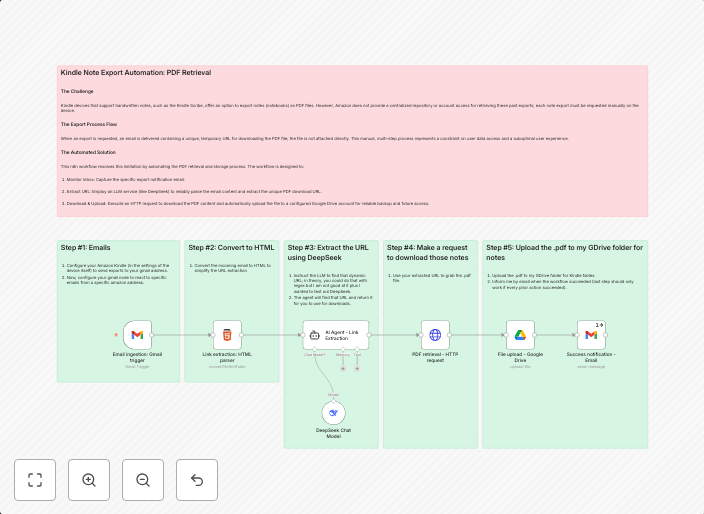
Automatically save Kindle handwritten notes to Google Drive with DeepSeek AI
Summary: This n8n workflow addresses the manual and cumbersome process of exporting handwritten notes from Kindle devices, such as the Kindle Scribe. It is...
Get This WorkflowAbout This Workflow
What This Workflow Does
This n8n workflow automates the process of saving handwritten notes from Kindle devices, such as the Kindle Scribe, to Google Drive. It leverages the DeepSeek AI integration to streamline note exportation and organization. By using this workflow, users can effortlessly access and manage their Kindle notes.
Who Should Use This
This workflow is ideal for Kindle users who value convenience and organization, particularly those who frequently take handwritten notes and want to access them across different devices.
Key Features
- Automates the export of handwritten notes from Kindle devices to Google Drive.
- Utilizes DeepSeek AI for efficient note summarization and organization.
- Saves users time by eliminating the need for manual note exportation.
- Ensures seamless access to Kindle notes across various devices.
How to Get Started
To use this workflow, simply import it into your n8n account and customize the settings to match your Google Drive and Kindle account configurations.
Use This Workflow in n8n →Similar Workflows




Affiliate Disclosure: We may earn a commission if you sign up for n8n through our links. This doesn't affect our recommendations.