Automatically sync Beex leads to HubSpot (Create & Update)
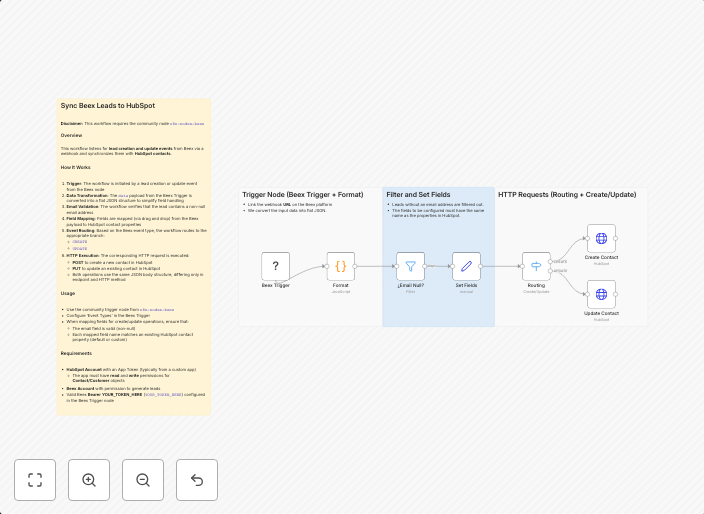
Summary Automatically sync your Beex leads to HubSpot by handling both creation and update events in real time. How It Works Trigger Activation: The...
Get This WorkflowAbout This Workflow
What This Workflow Does
This workflow automatically synchronizes Beex leads to HubSpot in real-time, handling both creation and update events. It enables seamless lead management and data consistency across platforms. This integration streamlines your sales and marketing processes.
Who Should Use This
This workflow is ideal for businesses and marketing teams using Beex as their CRM and HubSpot for sales and marketing automation. It can also benefit developers who want to integrate their Beex data with HubSpot.
Key Features
- Syncs Beex leads to HubSpot in real-time, ensuring up-to-date data across platforms.
- Handles both creation and update events, preventing data inconsistency.
- Allows for seamless lead management and data consistency.
- Supports real-time integration between Beex and HubSpot.
How to Get Started
To use this workflow, import it into your n8n instance and customize the settings to match your Beex and HubSpot credentials. Configure the workflow to fit your specific needs, and it will start synchronizing your Beex leads to HubSpot automatically.
Use This Workflow in n8n →Similar Workflows

Affiliate Disclosure: We may earn a commission if you sign up for n8n through our links. This doesn't affect our recommendations.