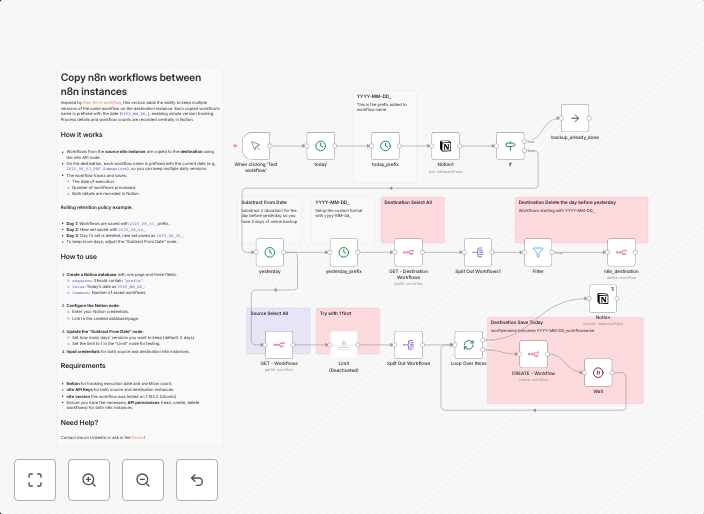
Backup n8n workflows with versioning and Notion tracking
Copy n8n workflows to a slave n8n repository Inspired by Alex Kim's workflow, this version adds the ability to keep multiple versions of the same workflow...
Get This WorkflowAbout This Workflow
What This Workflow Does
This n8n automation workflow is designed to backup your workflows with versioning and track them in Notion. It copies your workflows to a slave n8n repository and maintains multiple versions of each workflow, allowing you to easily revert to previous versions if needed. The workflow also integrates with Notion for centralized version tracking.
Who Should Use This
This workflow is ideal for developers and DevOps teams who want to maintain a reliable and version-controlled backup of their n8n workflows. It's also suitable for anyone who wants to ensure that their workflows are safely stored and easily recoverable in case of errors or data loss.
Key Features
- Versioning: The workflow maintains multiple versions of each workflow, allowing you to easily revert to previous versions if needed.
- Backup to slave repository: Your workflows are copied to a slave n8n repository, providing a safe and secure backup in case of data loss or errors.
- Notion integration: The workflow integrates with Notion for centralized version tracking and easy access to your workflow history.
- Automated tracking: The workflow automatically tracks changes to your workflows, ensuring that you always have a complete and accurate record of your workflow history.
How to Get Started
To use this workflow, import it into your n8n instance and customize the configuration to suit your needs. Make sure to update the workflow credentials and repository settings to ensure seamless operation.
Use This Workflow in n8n →Similar Workflows




Affiliate Disclosure: We may earn a commission if you sign up for n8n through our links. This doesn't affect our recommendations.