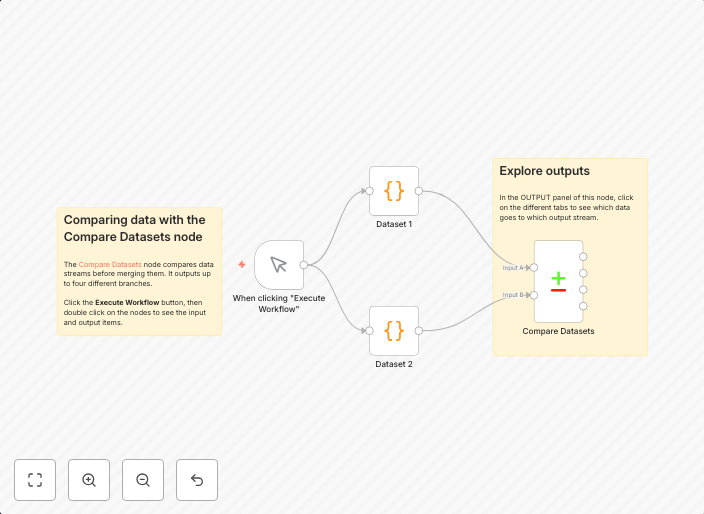
Comparing data with the Compare Datasets node
This workflow is designed to compare two datasets (Dataset 1 and Dataset 2) based on a common field, "fruit," and provide insights into the differences....
Get This WorkflowAbout This Workflow
What This Workflow Does
This n8n automation workflow compares two datasets, Dataset 1 and Dataset 2, based on a common field called "fruit." The workflow provides insights into the differences between the two datasets, enabling users to identify discrepancies and make informed decisions. By automating this comparison process, users can save time and effort.
Who Should Use This
This workflow is ideal for developers, data analysts, and business owners who work with datasets and need to identify differences between them. It's particularly useful for those who want to streamline their data comparison processes and gain actionable insights.
Key Features
- Automated Comparison: The workflow compares two datasets based on a common field, making it easy to identify differences.
- Insightful Reporting: The workflow provides a clear and concise report of the differences between the two datasets.
- Customizable Fields: Users can customize the common field used for comparison to suit their specific needs.
- Effortless Automation: The workflow automates the comparison process, saving users time and effort.
How to Get Started
To get started with this workflow, simply import it into your n8n instance and customize the workflow settings to match your specific needs. You can then connect your datasets and run the workflow to generate a report of the differences between them.
Use This Workflow in n8n →Similar Workflows



Affiliate Disclosure: We may earn a commission if you sign up for n8n through our links. This doesn't affect our recommendations.