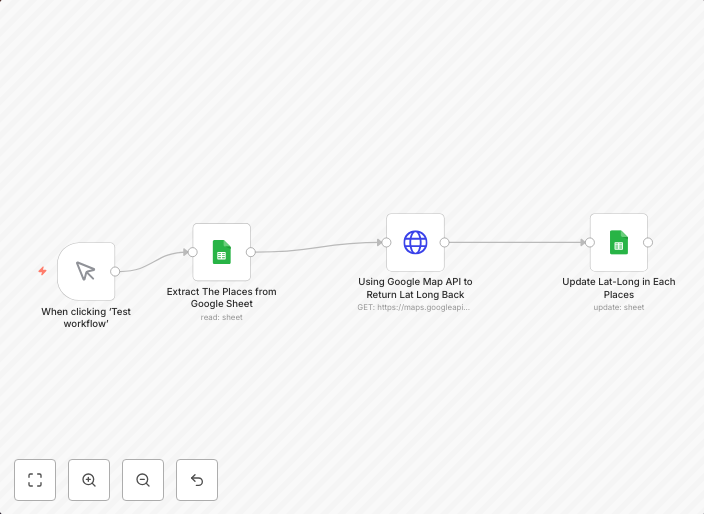
Convert addresses to latLong with Google Sheets and Google Maps API
Template DetailThis template automates the process of converting a list of addresses into their latitude and longitude (LatLong) coordinates using Google...
Get This WorkflowAbout This Workflow
Convert addresses to latLong with Google Sheets and Google Maps API
What This Workflow Does
This automation template converts a list of addresses in Google Sheets into their corresponding latitude and longitude (LatLong) coordinates using the Google Maps API. It streamlines the process of retrieving geolocation data, making it easier to work with spatial data in your workflow. The resulting coordinates are then available for further processing and analysis.
Who Should Use This
This template is ideal for developers, marketers, and business owners who need to work with geolocation data, such as mapping customer locations, analyzing market trends, or optimizing logistics.
Key Features
- Automated address conversion: The template uses the Google Maps API to convert addresses into LatLong coordinates, saving you time and effort.
- Google Sheets integration: Your address list is stored in Google Sheets, making it easy to update and manage your data.
- Customizable API settings: You can adjust the API settings to suit your specific needs, such as setting a custom API key or configuring the response format.
- LatLong data export: The resulting coordinates are exported in a format suitable for further processing and analysis.
How to Get Started
To use this template, simply import it into your n8n workflow, connect your Google Sheets account, and configure the Google Maps API settings to suit your needs. You can then customize the workflow to fit your specific use case and start automating your address conversion process.
Use This Workflow in n8n →Similar Workflows




Affiliate Disclosure: We may earn a commission if you sign up for n8n through our links. This doesn't affect our recommendations.