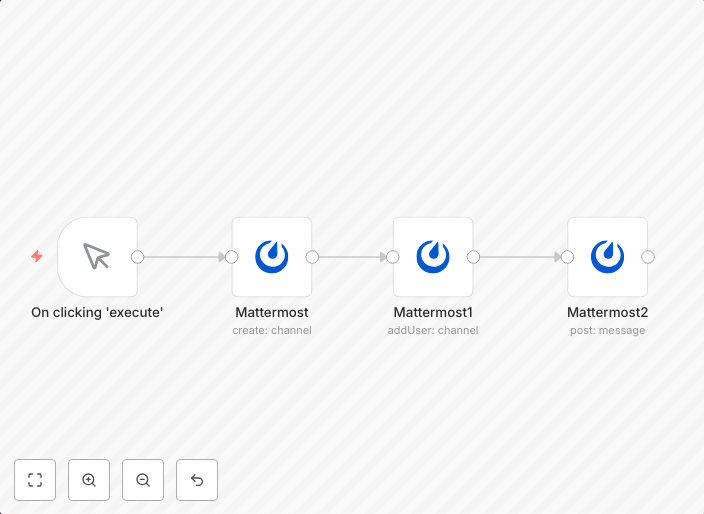
Create a channel, add a member, and post a message to the channel on Mattermost
This is an example that creates a channel, adds a member, and posts a message to the channel on Mattermost. You can refer to the documentation to learn how...
Get This WorkflowAbout This Workflow
What This Workflow Does
This workflow automates the process of creating a new channel, adding a member to that channel, and posting a message to the channel on Mattermost. With this workflow, you can quickly create channels and share information with specific team members. It's designed to streamline your communication workflow on Mattermost.
Who Should Use This
This workflow is ideal for team administrators, developers, and business owners who want to automate repetitive tasks on Mattermost and improve their team's communication efficiency.
Key Features
- Creates a new channel on Mattermost.
- Adds a specified member to the newly created channel.
- Posts a message to the channel with customizable content.
- Utilizes n8n to integrate with Mattermost and automate tasks.
How to Get Started
To get started, import this workflow into your n8n instance and customize it according to your team's needs. You can adjust the workflow to suit your specific requirements by modifying the trigger, actions, and settings within n8n.
Use This Workflow in n8n →Similar Workflows



Affiliate Disclosure: We may earn a commission if you sign up for n8n through our links. This doesn't affect our recommendations.