Create automated video ad clones with NanoBanana, Kling, Airtable and Blotato
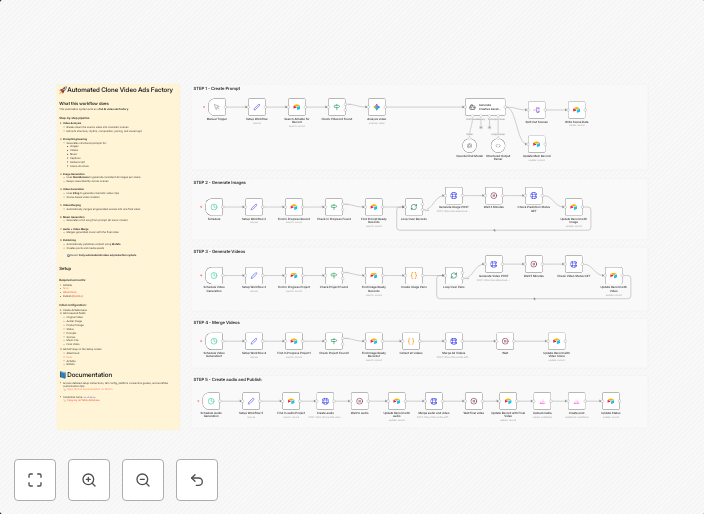
💥 Clone Video Ads Factory using NanoBanana, Kling and Publish with Blotato📄 Documentation: Notion Guide Workflow Overview Who is this for?This workflow is...
Get This WorkflowAbout This Workflow
What This Workflow Does
This workflow automates the process of creating clones of video ads using NanoBanana, Kling, and publishing them with Blotato. It streamlines the content creation and publishing process, saving time and increasing productivity. With this workflow, users can easily replicate and distribute their video ads across multiple platforms.
Who Should Use This
This workflow is ideal for marketers, business owners, and developers who manage large-scale content creation and distribution pipelines. It's particularly useful for those who want to leverage the power of AI-driven content generation and automation.
Key Features
- Generates clones of video ads using NanoBanana and Kling
- Automates the publishing process with Blotato
- Integrates with Airtable for storing and managing ad metadata
- Utilizes Multimodal AI for intelligent content generation and optimization
How to Get Started
To use this workflow, simply import it into your n8n account and customize the settings to match your specific requirements. You can then connect your NanoBanana, Kling, and Blotato accounts to the workflow and start automating your video ad cloning and publishing process.
Use This Workflow in n8n →Similar Workflows




Affiliate Disclosure: We may earn a commission if you sign up for n8n through our links. This doesn't affect our recommendations.