Create HubSpot companies & tasks from Jotform submissions with Google Sheets
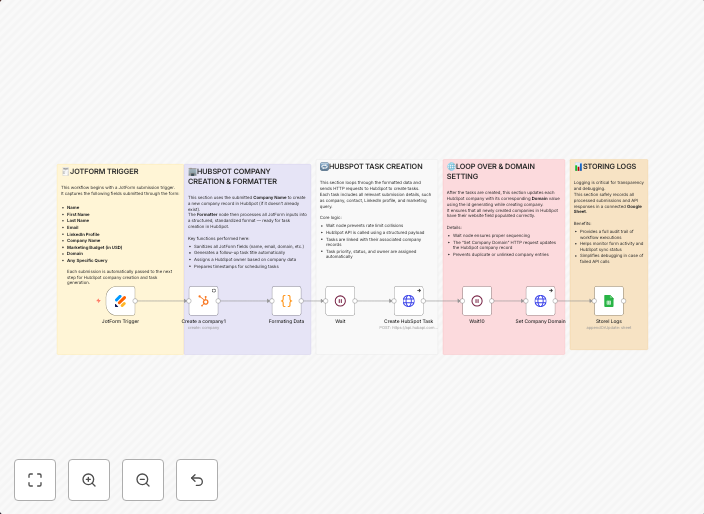
🛠️ Workflow: Jotform → HubSpot Company + Task Automation Automatically create or update HubSpot companies and generate follow-up tasks whenever a Jotform...
Get This WorkflowAbout This Workflow
What This Workflow Does
This n8n automation workflow automatically creates or updates HubSpot companies and generates follow-up tasks whenever a Jotform submission is received. It streamlines the process of managing customer data and task assignments, ensuring seamless integration between Jotform, Google Sheets, and HubSpot. By automating these tasks, users can save time and increase productivity.
Who Should Use This
This workflow is ideal for HubSpot users who rely on Jotform for form submissions and Google Sheets for data management. It's particularly useful for business owners, marketers, and developers who want to automate repetitive tasks and enhance their customer relationship management (CRM) workflow.
Key Features
- Automated HubSpot company creation: New companies are created in HubSpot based on Jotform submissions, ensuring accurate and up-to-date customer data.
- Task generation and assignment: Follow-up tasks are automatically generated and assigned to users in HubSpot, ensuring timely follow-ups and better customer engagement.
- Data synchronization: Google Sheets is used to store and synchronize data, allowing for easy access and management of customer information.
- Real-time updates: The workflow ensures that HubSpot companies and tasks are updated in real-time, reflecting the latest changes and submissions.
How to Get Started
To start using this workflow, simply import it into your n8n instance and customize the settings to fit your specific use case. Configure the workflow by connecting your Jotform, Google Sheets, and HubSpot accounts, and adjust the workflow settings to match your business needs.
Use This Workflow in n8n →Similar Workflows

Affiliate Disclosure: We may earn a commission if you sign up for n8n through our links. This doesn't affect our recommendations.