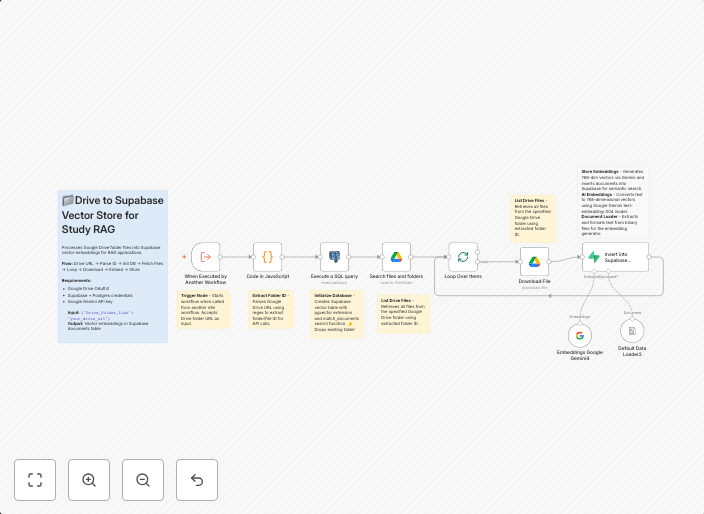
Create RAG vector database from Google Drive documents using Gemini & Supabase
How it works This workflow automates the process of converting Google Drive documents into searchable vector embeddings for AI-powered applications: • Takes...
Get This WorkflowAbout This Workflow
What This Workflow Does
This workflow automates the process of converting Google Drive documents into searchable vector embeddings, enabling AI-powered applications to easily access and utilize the content. It leverages Gemini and Supabase integrations to streamline the document extraction and database creation process. The resulting vector database can be used for various applications, such as content analysis and recommendation systems.
Who Should Use This
This workflow is ideal for developers and data engineers who need to integrate Google Drive documents with AI-powered systems, as well as business owners and marketers looking to leverage document content for analysis and insights.
Key Features
- Automated Document Extraction: The workflow extracts content from Google Drive documents, making it easily accessible for AI-powered applications.
- Gemini Integration: The workflow utilizes Gemini to convert the extracted content into searchable vector embeddings.
- Supabase Integration: The workflow integrates with Supabase to create a vector database, enabling efficient storage and querying of the embeddings.
- Flexible Customization: The workflow can be easily customized to suit specific use cases and requirements.
How to Get Started
To use this workflow, simply import it into your n8n instance and customize the settings as needed, such as connecting to your Google Drive and Supabase accounts.
Use This Workflow in n8n →Similar Workflows




Affiliate Disclosure: We may earn a commission if you sign up for n8n through our links. This doesn't affect our recommendations.