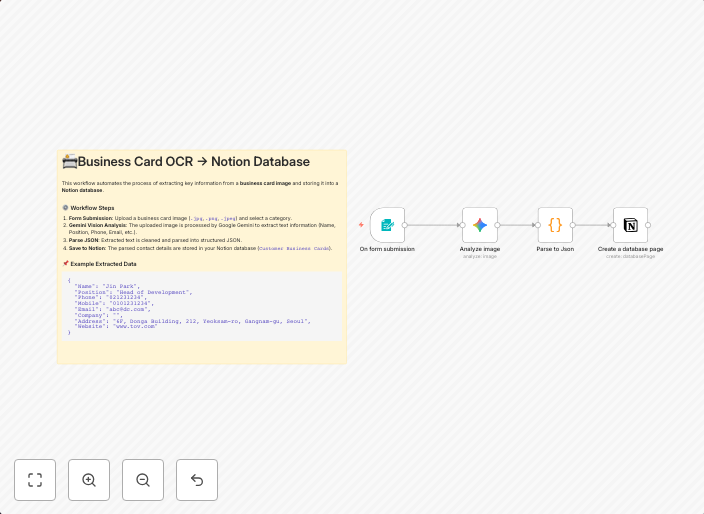
Digitize business cards to Notion database with Gemini Vision OCR
🧩 Summary Easily digitize and organize your business cards! This workflow allows you to upload a business card image, automatically extract contact...
Get This WorkflowAbout This Workflow
What This Workflow Does
This n8n automation workflow, "Digitize business cards to Notion database with Gemini Vision OCR", allows users to upload a business card image and automatically extract contact information from it. The workflow then stores the extracted data in a Notion database, making it easily accessible and organized. This process saves time and reduces manual data entry errors.
Who Should Use This
This workflow is ideal for business owners, marketers, and sales teams that frequently collect and manage business cards, such as those in the real estate, finance, or consulting industries.
Key Features
- Automated contact information extraction: This workflow uses Gemini Vision OCR to automatically extract contact information from uploaded business card images.
- Notion database integration: The extracted data is stored in a Notion database, providing a centralized and easily accessible repository for business card information.
- Image file upload: Users can upload business card images directly to the workflow for processing.
- Error-free data entry: The workflow reduces manual data entry errors by automating the extraction and storage of contact information.
Similar Workflows




Affiliate Disclosure: We may earn a commission if you sign up for n8n through our links. This doesn't affect our recommendations.