Download Threads videos & log results in Google Sheets
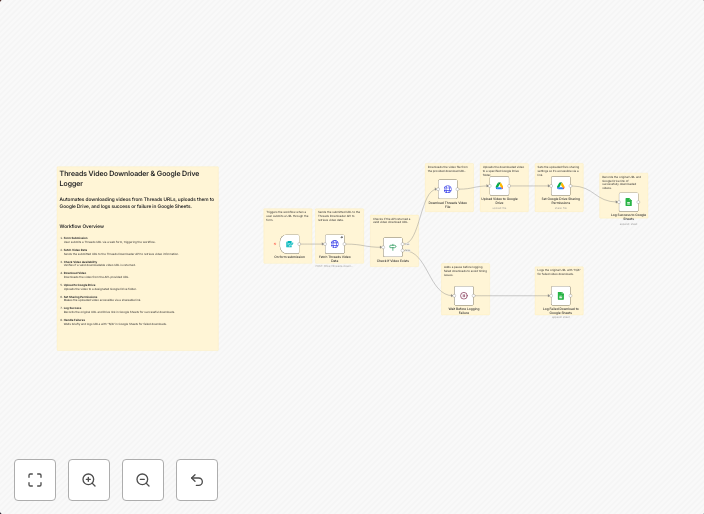
Threads Video Downloader & Google Drive Logger Automate downloading Threads videos from URLs, upload them to Google Drive, and log results in Google Sheets...
Get This WorkflowAbout This Workflow
What This Workflow Does
This n8n automation workflow, created by Igor Fediczko, automates the process of downloading videos from Threads, uploading them to Google Drive, and logging the results in a Google Sheets document. This workflow streamlines the process of managing video downloads, ensuring that files are safely stored and tracked. By automating this process, users can save time and effort.
Who Should Use This
This workflow is ideal for social media managers, content creators, and marketing teams who frequently download videos from Threads and need to track and organize their files. It can also be useful for developers and business owners who require automated file management solutions.
Key Features
- Download Threads videos: The workflow can automatically download videos from Threads URLs, making it easy to access and manage video content.
- Upload to Google Drive: Videos are uploaded to Google Drive, providing a secure and organized storage solution.
- Log results in Google Sheets: The workflow logs the video download results in a Google Sheets document, making it simple to track and analyze video downloads.
How to Get Started
To use this workflow, import it into your n8n instance and customize the settings to fit your specific needs. This may include configuring the Google Drive and Google Sheets integrations, as well as setting up the Threads video download parameters.
Use This Workflow in n8n →Similar Workflows




Affiliate Disclosure: We may earn a commission if you sign up for n8n through our links. This doesn't affect our recommendations.