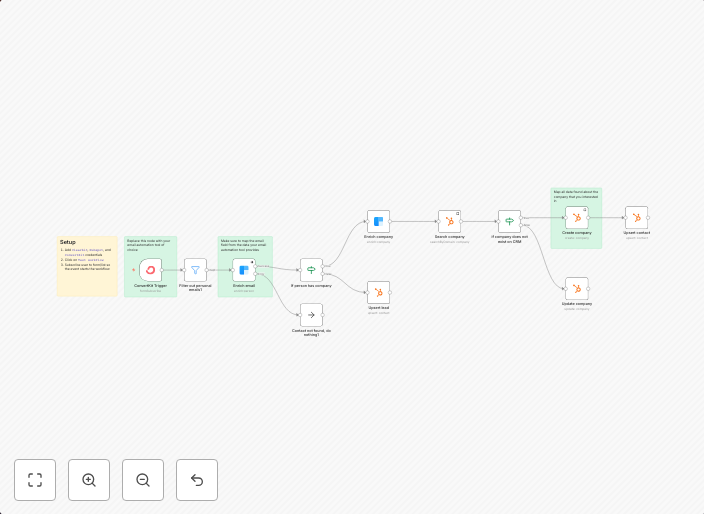
Enrich lead captured by ConvertKit and save it in Hubspot
Use CaseWhenever someone shows interest in your offerings by subscribing to a list in ConvertKit it could be a potential new customer. Typically you need to...
Get This WorkflowAbout This Workflow
What This Workflow Does
This workflow captures and enriches leads generated from ConvertKit subscribers by saving them in Hubspot. It automates the process of syncing subscriber data from ConvertKit to Hubspot, enabling businesses to manage and nurture their leads more effectively. This integration enables businesses to create a unified view of their potential customers and tailor their marketing strategies accordingly.
Who Should Use This
This workflow is suitable for business owners, marketers, and developers who use ConvertKit for email marketing and Hubspot for CRM and lead management. It's particularly useful for teams that want to streamline their lead generation and nurturing processes.
Key Features
- Lead Capture: Automatically captures new subscribers from ConvertKit and adds them to Hubspot as new contacts.
- Data Enrichment: Syncs subscriber data from ConvertKit to Hubspot, including email addresses, names, and other relevant information.
- Lead Nurturing: Enables businesses to segment and target their leads based on their preferences and behaviors captured in ConvertKit.
- Real-time Syncing: Ensures that lead data is up-to-date and synchronized between ConvertKit and Hubspot in real-time.
How to Get Started
To use this workflow, simply import it into your n8n instance and connect your ConvertKit and Hubspot accounts. Customize the workflow settings to match your specific business needs and start automating your lead generation process today.
Use This Workflow in n8n →Similar Workflows

Affiliate Disclosure: We may earn a commission if you sign up for n8n through our links. This doesn't affect our recommendations.