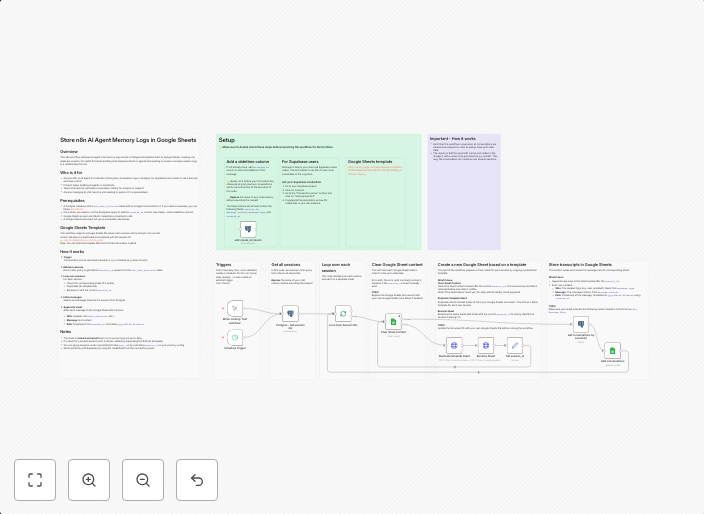
Export AI agent conversation logs from Postgres to Google Sheets
OverviewThis n8n workflow retrieves AI agent chat memory logs stored in Postgres and pushes them to Google Sheets, creating one sheet per session. It’s...
Get This WorkflowAbout This Workflow
What This Workflow Does
This n8n workflow automates the process of exporting AI agent conversation logs from a Postgres database to a Google Sheets document. It creates a separate sheet for each session, making it a convenient way to organize and visualize chat memory logs. This workflow simplifies data export and enables users to easily analyze and report on AI agent conversations.
Who Should Use This
This workflow is suitable for developers, IT professionals, and business owners who need to monitor and analyze AI agent performance. It's particularly useful for those managing customer support chatbots or other AI-powered systems that generate conversation logs.
Key Features
- Retrieves AI agent chat memory logs from a Postgres database
- Pushes logs to a Google Sheets document, creating a new sheet for each session
- Simplifies data export and organization, making it easier to analyze and report on AI agent conversations
How to Get Started
To use this workflow, import it into your n8n environment and configure the workflow settings to connect to your Postgres database and Google Sheets account. Customize the workflow as needed to fit your specific requirements and data structure.
Use This Workflow in n8n →Similar Workflows




Affiliate Disclosure: We may earn a commission if you sign up for n8n through our links. This doesn't affect our recommendations.