Export PDF invoices from SmartBill to Google Drive
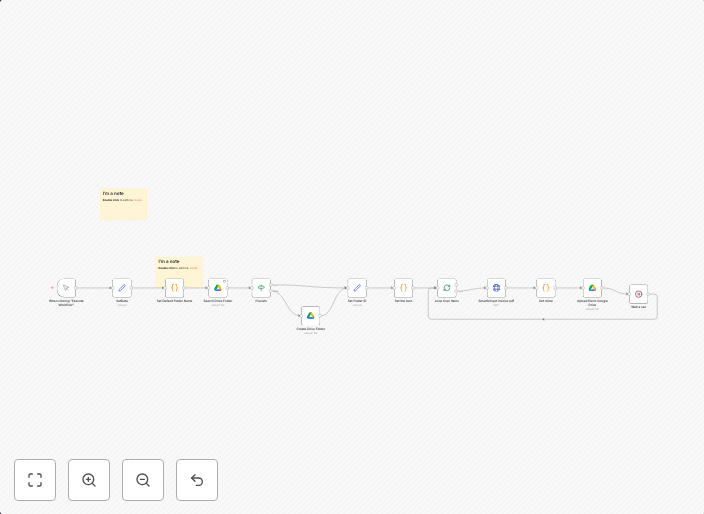
This workflow automates the retrieval of invoice PDFs from the Smartbill API and saves them to Google Drive in a dynamically created folder based on last...
Get This WorkflowAbout This Workflow
What This Workflow Does
This workflow automates the export of PDF invoices from the SmartBill API to Google Drive. It retrieves invoices in a dynamically created folder based on the invoice date, making it easier to manage and organize invoices. This workflow streamlines the process of storing invoices in a secure and accessible location.
Who Should Use This
This workflow is ideal for business owners, accountants, and administrators responsible for managing invoices and financial documents. It can help reduce manual labor, increase efficiency, and improve organization.
Key Features
- Automated Invoice Retrieval: The workflow connects to the SmartBill API to retrieve PDF invoices.
- Dynamic Folder Creation: Invoices are saved to a folder named after the invoice date, making it easy to find specific invoices.
- Secure Storage: Invoices are stored in Google Drive, a secure and cloud-based storage solution.
How to Get Started
To use this workflow, simply import it into your n8n instance and connect your SmartBill and Google Drive accounts. Customize the workflow as needed by adjusting the folder naming convention and other settings to fit your organization's requirements.
Use This Workflow in n8n →Similar Workflows


Affiliate Disclosure: We may earn a commission if you sign up for n8n through our links. This doesn't affect our recommendations.