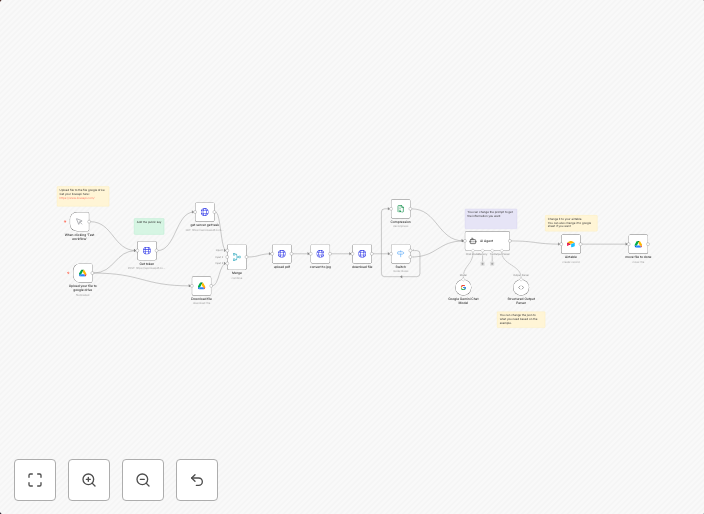
Extract and log data to Airtable with Google Gemini, ILovePDF, and Google Drive
Who is this workflow template for?This workflow template is perfect for freelancers, small business owners, accounting teams, or anyone responsible for...
Get This WorkflowAbout This Workflow
What This Workflow Does
This workflow template automates the process of extracting data, converting files, and logging information to Airtable using Google Gemini, ILovePDF, and Google Drive. It enables users to streamline tasks, reduce manual effort, and increase productivity. The workflow extracts data from a Google Gemini table, converts files using ILovePDF, and then logs the extracted data and file information to Airtable.
Who Should Use This
This workflow template is perfect for freelancers, small business owners, accounting teams, or anyone responsible for managing client data, invoices, or other business-related information. It's ideal for individuals or teams looking to automate repetitive tasks and improve their workflow efficiency.
Key Features
- Extracts data from a Google Gemini table
- Converts files to a suitable format using ILovePDF
- Logs extracted data and file information to Airtable
- Utilizes Google Drive for file storage and retrieval
How to Get Started
To start using this workflow template, import it into your n8n account and customize the settings to match your specific requirements. Make sure to update the Google Gemini, ILovePDF, and Google Drive connections to reflect your actual account credentials and setup.
Use This Workflow in n8n →Similar Workflows




Affiliate Disclosure: We may earn a commission if you sign up for n8n through our links. This doesn't affect our recommendations.