Extract and process information directly from PDF using Claude and Gemini
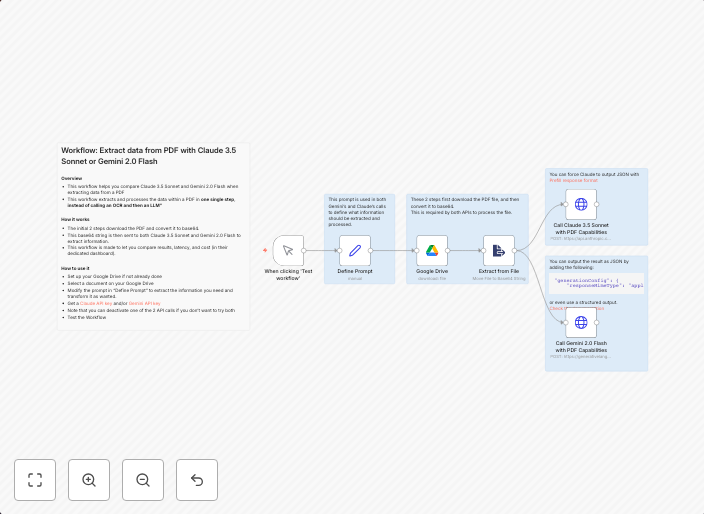
OverviewThis workflow helps you compare Claude 3.5 Sonnet and Gemini 2.0 Flash when extracting data from a PDFThis workflow extracts and processes the data...
Get This WorkflowAbout This Workflow
What This Workflow Does
This workflow automates the extraction and processing of data from PDFs, utilizing the capabilities of Claude and Gemini for AI-enhanced results. By comparing the performance of these two AI assistants, the workflow enables users to evaluate and refine their PDF data extraction processes. The extracted data is then processed for further use.
Who Should Use This
Developers, data analysts, and business owners who work with PDFs and rely on AI-powered tools for data extraction and processing can benefit from this workflow. It is ideal for those who want to optimize their workflow and improve the accuracy of their data extraction tasks.
Key Features
- Extracts data from PDFs using Claude and Gemini
- Compares the performance of Claude 3.5 Sonnet and Gemini 2.0 Flash for data extraction
- Processes the extracted data for further use
- Enhances data extraction accuracy with AI-powered tools
- Automates repetitive tasks, saving time and improving productivity
How to Get Started
To get started with this workflow, import it into your n8n instance and customize it to fit your specific PDF data extraction needs. Adjust the workflow settings to align with your desired data extraction and processing requirements.
Use This Workflow in n8n →Similar Workflows




Affiliate Disclosure: We may earn a commission if you sign up for n8n through our links. This doesn't affect our recommendations.