Extract and upload files from zip archives to Google Drive
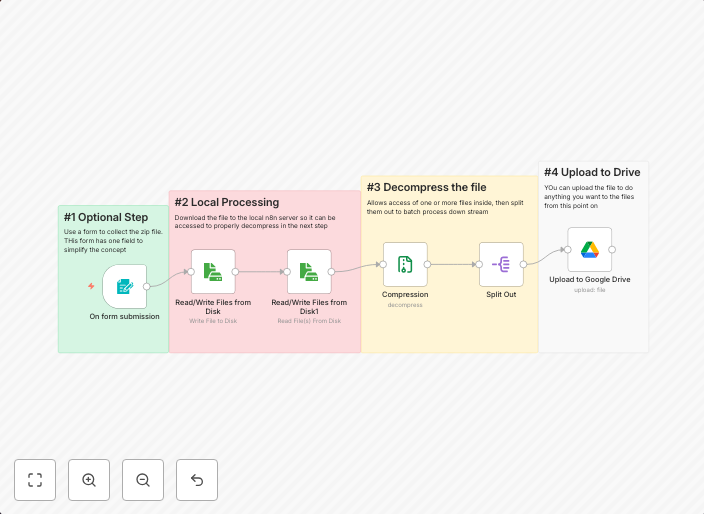
Extract and Upload Files from Zip to Google Drive How it works This workflow automatically extracts all files from an uploaded zip archive and uploads each...
Get This WorkflowAbout This Workflow
What This Workflow Does
This workflow automates the process of extracting files from zip archives and uploading them to Google Drive. It simplifies file management by saving time and effort, making it easier to organize and access files. The workflow can handle multiple zip archives and upload each file individually.
Who Should Use This
This workflow is suitable for individuals or teams who need to frequently extract and upload files from zip archives to Google Drive, such as developers, marketers, and business owners who work with large archives or have to share files with collaborators.
Key Features
- Automated File Extraction: Extracts all files from uploaded zip archives, saving time and effort.
- Individual File Upload: Uploads each file from the archive to Google Drive, keeping files organized and easily accessible.
- Support for Multiple Archives: Handles multiple zip archives, making it ideal for users who work with large collections of files.
- Integration with Google Drive: Seamlessly integrates with Google Drive, allowing users to upload files to their desired folders and share with collaborators.
How to Get Started
To get started with this workflow, import it into your n8n instance and customize it by connecting your Google Drive account and selecting the desired folder for uploaded files. You can then use the workflow to extract and upload files from zip archives, streamlining your file management process.
Use This Workflow in n8n →Similar Workflows



Affiliate Disclosure: We may earn a commission if you sign up for n8n through our links. This doesn't affect our recommendations.