Extract attendance from Google Drive images to sheets with VLM run AI & Gmail alerts
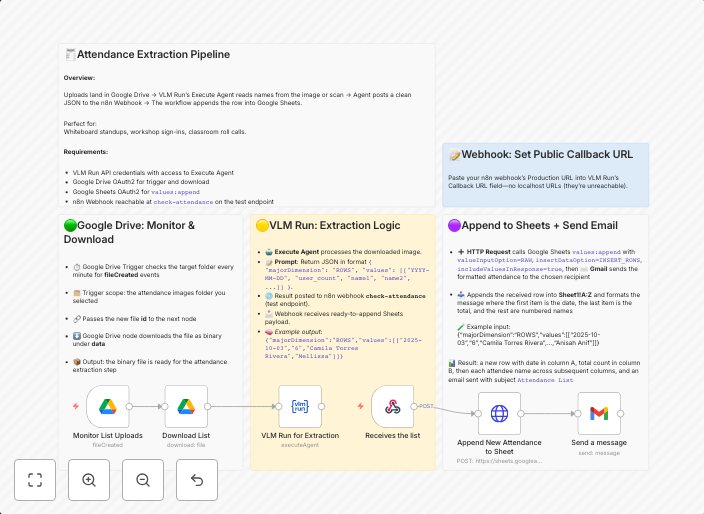
🧾 Attendance Extraction & Notification Pipeline (Google Drive + VLM Run + Google Sheets + Gmail) ⚙️ What This Workflow Does This workflow automates daily...
Get This WorkflowAbout This Workflow
What This Workflow Does
This workflow extracts attendance data from images stored in Google Drive using the VLM Run AI integration, and then updates a Google Sheets spreadsheet with the extracted data. Additionally, it sends notifications to users via Gmail when the extraction process is complete. This automation streamlines the process of tracking attendance, saving time and reducing manual errors.
Who Should Use This
This workflow is ideal for developers, business owners, and administrators who need to automate attendance tracking processes, particularly those who frequently update attendance records from image files stored in Google Drive.
Key Features
- Automated attendance extraction: Extracts attendance data from images in Google Drive using VLM Run AI.
- Google Sheets update: Updates a Google Sheets spreadsheet with the extracted attendance data.
- Gmail notifications: Sends notifications to users via Gmail when the extraction process is complete.
- Daily operation: Runs the workflow daily to ensure attendance records are up-to-date.
How to Get Started
To use this workflow, simply import it into your n8n account, and then customize it to fit your specific attendance tracking requirements. Adjust the Google Drive, Google Sheets, and Gmail settings to match your account credentials and spreadsheet layout.
Use This Workflow in n8n →Similar Workflows




Affiliate Disclosure: We may earn a commission if you sign up for n8n through our links. This doesn't affect our recommendations.