Extract contact information from business cards with Mistral OCR and GPT-4o-mini
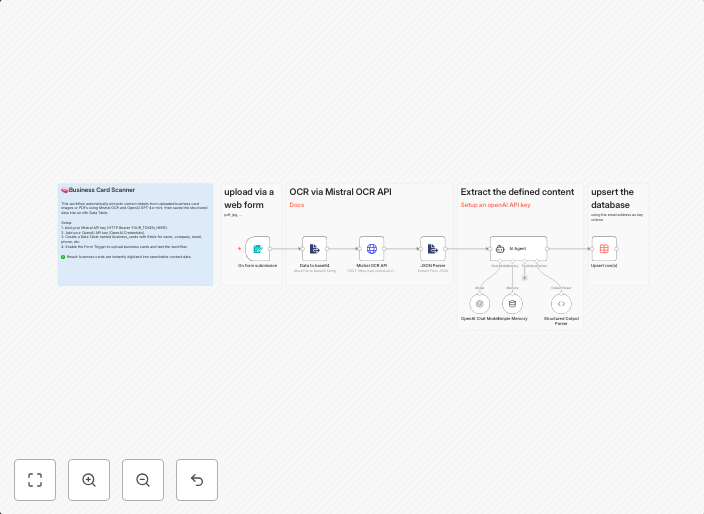
Bildschirmfoto 20251010 um 22.54. 🧠 Business Card Scanner – Automate Contact Extraction This workflow automates the process of extracting contact details...
Get This WorkflowAbout This Workflow
What This Workflow Does
This workflow automates the process of extracting contact details from business cards using Mistral OCR and GPT-4o-mini, making it easier to digitize and organize contact information. By streamlining this process, you can save time and reduce manual data entry. The extracted contact information can be used for various purposes such as CRM management, email marketing, or sales follow-ups.
Who Should Use This
This workflow is ideal for developers, marketers, and business owners who frequently collect business cards at events, conferences, or meetings. By automating the extraction process, they can efficiently manage their contact lists and focus on more strategic activities.
Key Features
- Automated contact extraction: Leverage Mistral OCR and GPT-4o-mini to extract contact details from business cards with high accuracy.
- Efficient data organization: Streamline your contact management process by automatically digitizing and categorizing contact information.
- Time-saving: Reduce manual data entry and save time for more important tasks.
- Integration-ready: Customize the workflow to integrate with your existing CRM, marketing, or sales tools.
How to Get Started
To use this workflow, simply import it into your n8n account and customize the settings to fit your specific needs. You can then use the extracted contact information to enhance your business operations and stay organized.
Use This Workflow in n8n →Similar Workflows




Affiliate Disclosure: We may earn a commission if you sign up for n8n through our links. This doesn't affect our recommendations.