Extract PDF itineraries to Google Sheets with GPT-4.1-Mini & Gmail notifications
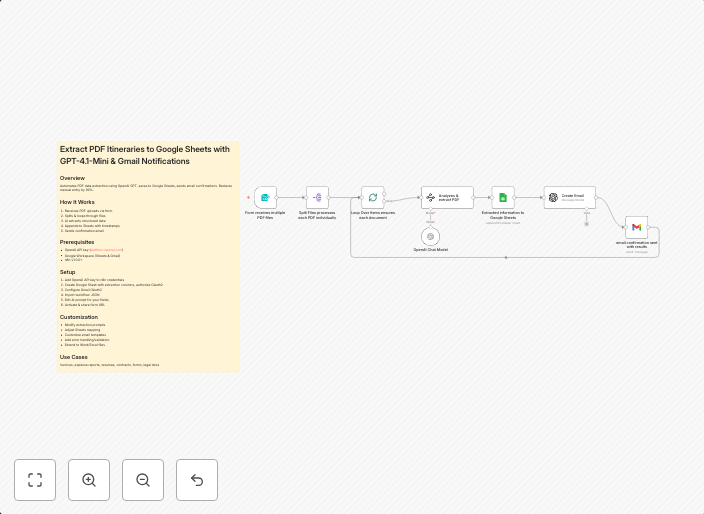
Extract PDF Itineraries to Google Sheets with GPT-4.1-Mini & Gmail Notifications OverviewAutomates PDF data extraction using OpenAI GPT, saves to Google...
Get This WorkflowAbout This Workflow
What This Workflow Does
This workflow automates the process of extracting PDF itinerary data using OpenAI's GPT-4.1-Mini and saves the extracted information to a Google Sheet. Additionally, it sends notifications to a designated Gmail address upon successful extraction. This workflow streamlines the process of data entry and provides real-time updates on extracted data.
Who Should Use This
This workflow is ideal for businesses, travel agencies, or organizations that frequently receive and process PDF itineraries, as well as developers and marketers who want to leverage AI-powered data extraction and automation.
Key Features
- AI-Powered Data Extraction: Utilizes OpenAI's GPT-4.1-Mini to extract relevant data from PDF itineraries.
- Automated Data Synchronization: Saves extracted data to a Google Sheet, ensuring real-time updates and easy access to information.
- Customizable Notifications: Sends notifications to a designated Gmail address upon successful extraction, keeping stakeholders informed of progress.
- Integration with Google Sheets: Allows for seamless data storage and analysis in a Google Sheet.
How to Get Started
To use this workflow, import it into your n8n account and customize the Gmail and Google Sheets integrations to fit your specific needs. Configure the workflow by setting up your Gmail address and Google Sheet, and then test the automation to ensure smooth data extraction and synchronization.
Use This Workflow in n8n →Similar Workflows




Affiliate Disclosure: We may earn a commission if you sign up for n8n through our links. This doesn't affect our recommendations.