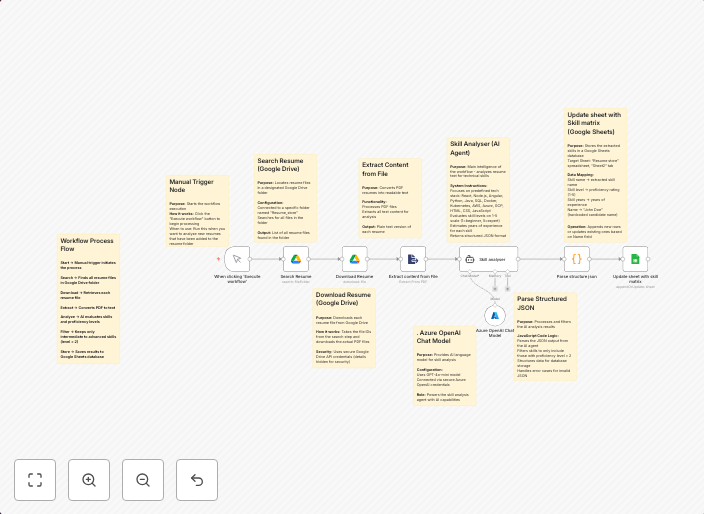
Extract skill matrix to Google Sheets with Google Drive and GPT-4o
DescriptionAutomatically extract a structured skill matrix from PDF resumes in a Google Drive folder and store results in Google Sheets. Uses Azure OpenAI...
Get This WorkflowAbout This Workflow
What This Workflow Does
This workflow automates the process of extracting a skill matrix from PDF resumes stored in a Google Drive folder and uploading the results to a Google Sheets document. It leverages GPT-4o AI capabilities to provide a structured and organized summary of the skills listed in the resumes. By streamlining this process, users can save time and effort when reviewing candidate skills.
Who Should Use This
This workflow is ideal for HR teams, recruiters, and talent acquisition specialists looking to efficiently evaluate and compare candidate skills across multiple resumes.
Key Features
- Automated skill matrix extraction: Extracts relevant skills from PDF resumes in a Google Drive folder.
- GPT-4o AI-powered summarization: Uses Azure OpenAI's GPT-4o to provide a structured and organized summary of the skills listed in the resumes.
- Google Sheets integration: Uploads the extracted skill matrix to a Google Sheets document for easy review and comparison.
- Folder-based processing: Supports processing of multiple PDF resumes stored in a designated Google Drive folder.
How to Get Started
To get started with this workflow, import it into your n8n instance and configure the Google Drive and Google Sheets integrations to connect to your account. Customize the workflow settings to match your specific requirements, such as the Google Drive folder to process and the Google Sheets document to upload the results to.
Use This Workflow in n8n →Similar Workflows




Affiliate Disclosure: We may earn a commission if you sign up for n8n through our links. This doesn't affect our recommendations.