Generate & upload images with Image-to-Image GPT, Google Sheets & Drive
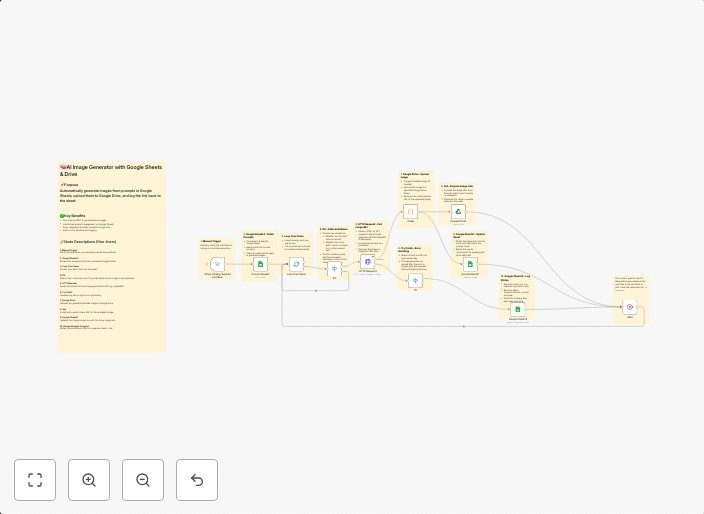
🖼️ Image-to-Image AI Generator from Google Sheets with Google Drive Upload✅ Use Case Automatically generate AI images from prompts listed in a Google...
Get This WorkflowAbout This Workflow
What This Workflow Does
This workflow automates the process of generating images using Image-to-Image GPT, storing the prompts in a Google Sheet, and uploading the generated images directly to Google Drive. It streamlines the content creation process, saving time and effort for users. By integrating AI image generation with Google Sheets and Drive, this workflow makes it easy to manage and deploy generated content at scale.
Who Should Use This
This workflow is ideal for developers, marketers, and business owners looking to leverage the power of Multimodal AI for content creation, such as social media, advertising, or e-commerce applications.
Key Features
- Generate AI images from Google Sheets prompts: The workflow reads prompts from a Google Sheet and uses Image-to-Image GPT to generate corresponding images.
- Store and manage prompts in Google Sheets: The workflow allows users to easily update, add, or remove prompts in a centralized Google Sheet.
- Upload images to Google Drive: The generated images are automatically uploaded to Google Drive for easy access and sharing.
How to Get Started
To use this workflow, simply import it into your n8n environment and customize the settings to match your Google Sheets and Drive accounts. Adjust the workflow to fit your specific use case, and start generating AI images on the fly.
Use This Workflow in n8n →Similar Workflows




Affiliate Disclosure: We may earn a commission if you sign up for n8n through our links. This doesn't affect our recommendations.