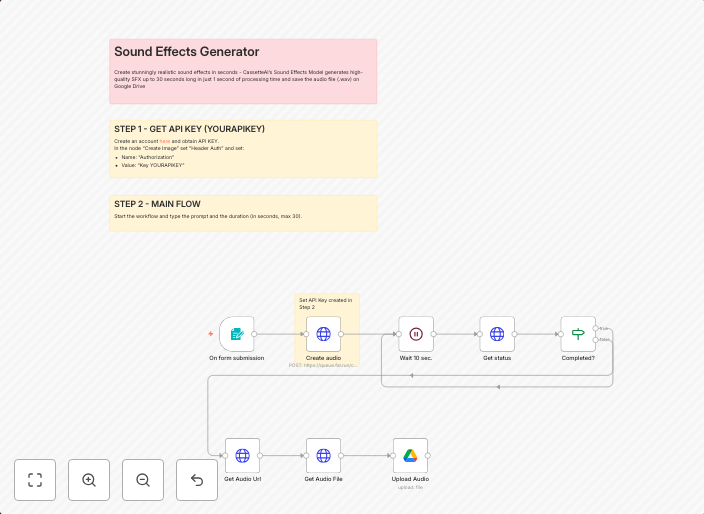
Generate realistic sound effects with CassetteAI and save to Google Drive
The Sound Effects Generator is an automated workflow that allows users to create realistic sound effects using AI and save them directly to Google Drive. It...
Get This WorkflowAbout This Workflow
What This Workflow Does
The Sound Effects Generator is an automated workflow that leverages CassetteAI to create realistic sound effects using Multimodal AI technology, streamlining the content creation process for users. This workflow eliminates the need for manual sound effect creation, saving time and effort. The generated sound effects are then saved directly to Google Drive for easy access and organization.
Who Should Use This
Developers, marketers, and content creators can benefit from using this workflow to enhance their audio content with high-quality sound effects. This automation is particularly useful for those looking to create engaging audio materials, such as podcasts, videos, or video games.
Key Features
- Automates sound effect creation using CassetteAI's Multimodal AI technology
- Saves generated sound effects directly to Google Drive for easy access
- Streamlines content creation process by eliminating manual sound effect creation
- Integrates with Google Drive for seamless storage and organization
How to Get Started
To use this workflow, simply import it into your n8n account and customize the settings to fit your specific needs. This may include configuring the AI model, adjusting the sound effect parameters, and linking your Google Drive account for storage and organization.
Use This Workflow in n8n →Similar Workflows




Affiliate Disclosure: We may earn a commission if you sign up for n8n through our links. This doesn't affect our recommendations.