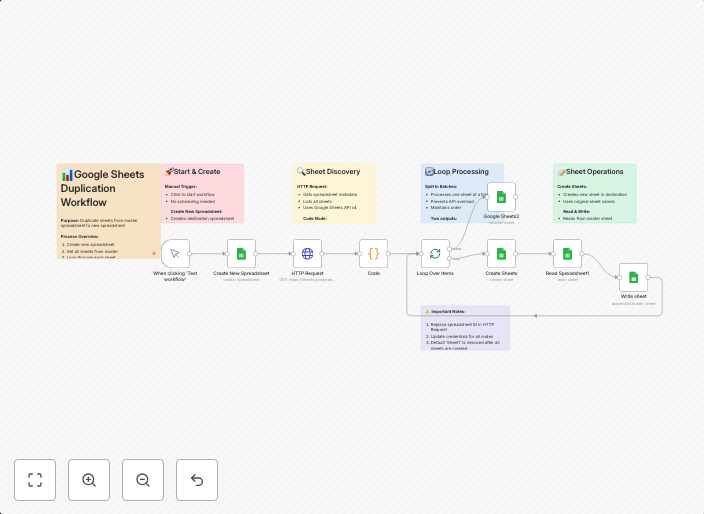
Google Sheets duplication & enrichment automation
How it Works This workflow reads sheet details from a source Google Spreadsheet, creates a new spreadsheet, replicates the sheet structure, enriches the...
Get This WorkflowAbout This Workflow
Google Sheets Duplication & Enrichment Automation
This workflow, created by Igor Fediczko, automates the process of duplicating and enriching sheet structures from a source Google Spreadsheet. It creates a new spreadsheet, replicates the sheet structure, and adds enriched data, making it an efficient solution for document extraction and management.
Who Should Use This
This workflow is suitable for developers, marketers, and business owners who handle large amounts of data in Google Sheets and require efficient data duplication and enrichment processes.
Key Features
- Duplicate sheet structure: The workflow replicates the sheet structure from the source Google Spreadsheet to the new spreadsheet.
- Enrich data: It adds enriched data to the new spreadsheet, making it a valuable tool for document extraction and management.
- Efficient data management: By automating the process, users save time and reduce manual errors associated with data duplication and enrichment.
How to Get Started
To use this workflow, simply import it into your n8n instance and customize the settings to match your specific requirements. You can then trigger the workflow by connecting the source Google Spreadsheet, and n8n will take care of the data duplication and enrichment process.
Use This Workflow in n8n →Similar Workflows




Affiliate Disclosure: We may earn a commission if you sign up for n8n through our links. This doesn't affect our recommendations.