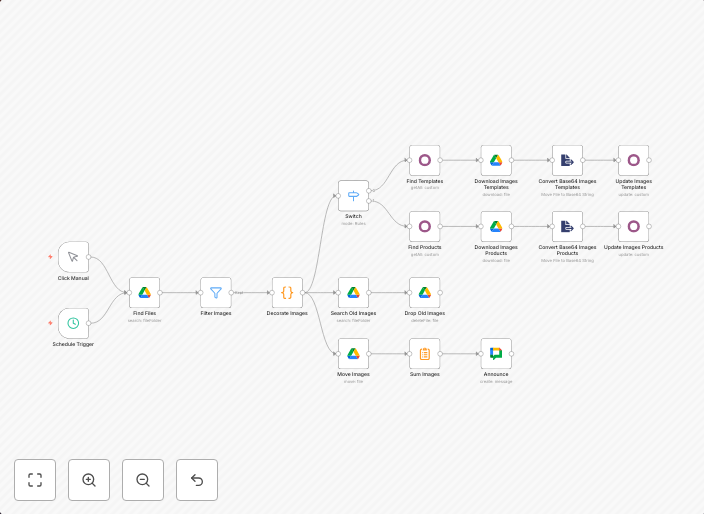
Import Odoo product images from Google Drive
ObjectiveThis workflow automatically imports product images from Google Drive and associates them with templates and products in Odoo.
Get This WorkflowAbout This Workflow
What This Workflow Does
This workflow imports product images from Google Drive and automatically associates them with templates and products in Odoo. It streamlines the process of updating product visuals, reducing manual effort and minimizing errors. By automating this task, you can ensure consistent and up-to-date product information across your Odoo system.
Who Should Use This
This workflow is suitable for Odoo administrators, developers, and marketing teams who manage product images and catalogs. Its automation capabilities make it particularly useful for businesses with large product portfolios and frequent image updates.
Key Features
- Imports product images from Google Drive folders and subfolders
- Automatically associates images with Odoo product templates and products
- Updates product visuals in real-time, reducing manual effort and minimizing errors
- Compatible with various file types, including JPEG, PNG, and GIF
How to Get Started
To use this workflow, simply import it into your n8n account and connect your Google Drive and Odoo integrations. Customize the workflow settings to match your specific requirements, and start importing product images and updating your Odoo catalog with ease.
Use This Workflow in n8n →Similar Workflows


Affiliate Disclosure: We may earn a commission if you sign up for n8n through our links. This doesn't affect our recommendations.