Learn how to use binary data in n8n (video included)
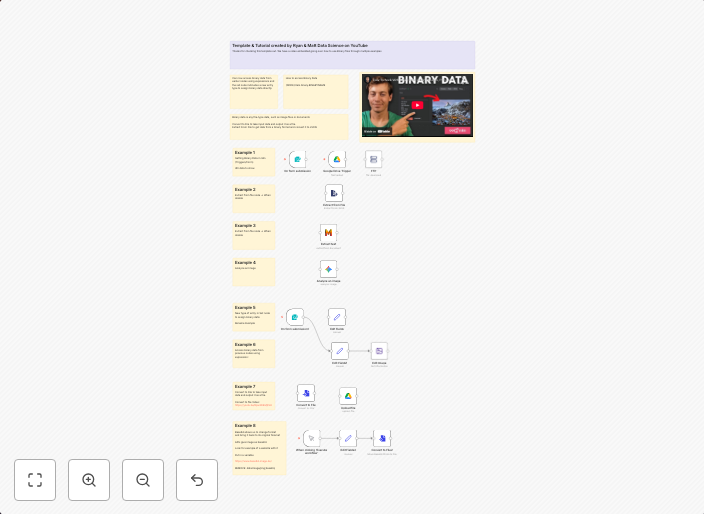
This template and YouTube video goes over 8 different examples of how we can utilize Binary data within n8n. We start with brining in Binary data with...
Get This WorkflowAbout This Workflow
What This Workflow Does
This n8n automation workflow is a comprehensive guide to utilizing binary data within the platform. It includes eight different examples of how to work with binary data, covering topics from importing binary data to advanced usage scenarios. The workflow is accompanied by a YouTube video for easy understanding and implementation.
Who Should Use This
This workflow is designed for developers, IT professionals, and data specialists who are looking to leverage binary data in their n8n automation workflows. It's ideal for those who want to streamline file management, data processing, and integration tasks.
Key Features
- Importing binary data from various sources, including files and APIs.
- Encoding and decoding binary data for secure transmission and storage.
- Using binary data in advanced workflows, such as image and audio processing.
- Demonstrating binary data usage in conjunction with other n8n integrations and functions.
- Providing a real-world example of using binary data to automate tasks.
How to Get Started
To use this workflow, import it into your n8n instance and customize it to fit your specific needs. The workflow includes detailed documentation and a YouTube video to help you understand the examples and implement them in your own projects.
Use This Workflow in n8n →Similar Workflows



Affiliate Disclosure: We may earn a commission if you sign up for n8n through our links. This doesn't affect our recommendations.