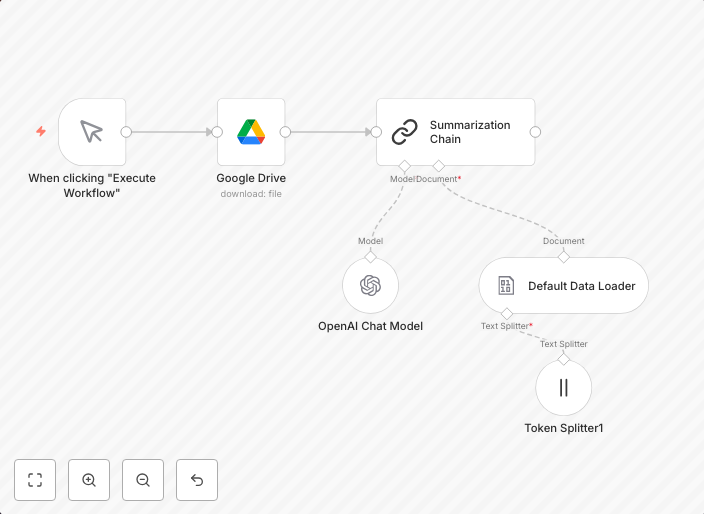
Load and summarize Google Drive files with AI
This workflow includes advanced features like text summarization and tokenization, it's ideal for automating document processing tasks that require parsing...
Get This WorkflowAbout This Workflow
What This Workflow Does
This workflow automates the process of loading and summarizing Google Drive files using advanced AI features such as text summarization and tokenization. By utilizing these features, users can efficiently process and extract key information from documents, saving time and increasing productivity. The workflow is designed to streamline document processing tasks.
Who Should Use This
This workflow is ideal for developers, marketers, and business owners who frequently deal with large volumes of documents and need to extract relevant information quickly. It's particularly useful for those who want to automate tasks that require parsing and summarizing documents.
Key Features
- Text Summarization: Automatically summarize long documents into concise, easily digestible versions.
- Tokenization: Break down text into individual units (tokens) for easier analysis and processing.
- Google Drive Integration: Seamlessly import files from Google Drive and process them within the workflow.
- AI-Powered Processing: Utilize advanced AI features to extract key information from documents and improve overall efficiency.
How to Get Started
To use this workflow, simply import it into your n8n account and customize the settings to fit your specific needs. You can then connect your Google Drive account and start processing your files, enjoying the benefits of automated document summarization and analysis.
Use This Workflow in n8n →Similar Workflows




Affiliate Disclosure: We may earn a commission if you sign up for n8n through our links. This doesn't affect our recommendations.