Marketing analytics reports with Google Analytics, Sheets, Slides & email alerts
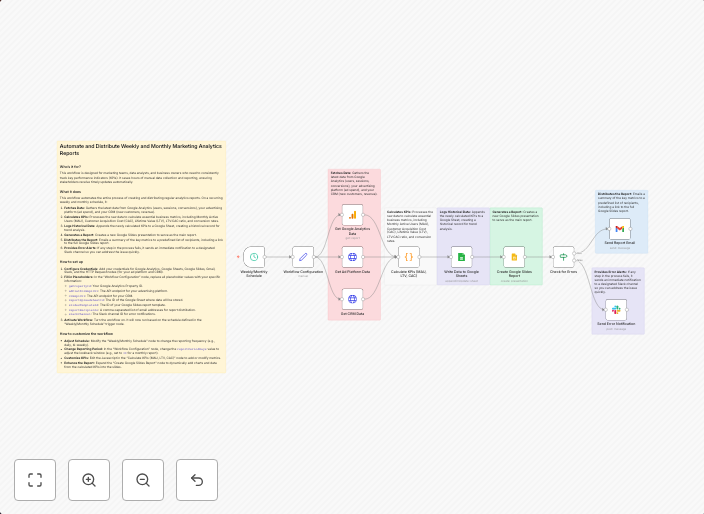
Automate and Distribute Weekly and Monthly Marketing Analytics Reports Who's it for?This workflow is designed for marketing teams, data analysts, and...
Get This WorkflowAbout This Workflow
What This Workflow Does
This workflow automates the creation and distribution of weekly and monthly marketing analytics reports using Google Analytics, Google Sheets, and Google Slides. It extracts key insights, generates reports, and sends email alerts to stakeholders. This saves time and streamlines the reporting process.
Who Should Use This
Marketing teams, data analysts, and other professionals responsible for creating and disseminating marketing analytics reports will benefit from this workflow. It's designed to simplify the reporting process, making it easier to make data-driven decisions.
Key Features
- Automated report generation: Extracts key insights from Google Analytics and populates Google Sheets with essential data.
- Customizable reporting: Easily adjust the report layout, structure, and content using Google Sheets and Google Slides.
- Scheduled email alerts: Sends reports to stakeholders on a weekly or monthly basis, ensuring timely access to critical marketing analytics insights.
How to Get Started
To use this workflow, import it into your n8n instance and customize the settings to match your specific requirements, such as connecting your Google Analytics and Google Sheets accounts. Adjust the report frequency, layout, and content to suit your needs.
Use This Workflow in n8n →Similar Workflows




Affiliate Disclosure: We may earn a commission if you sign up for n8n through our links. This doesn't affect our recommendations.