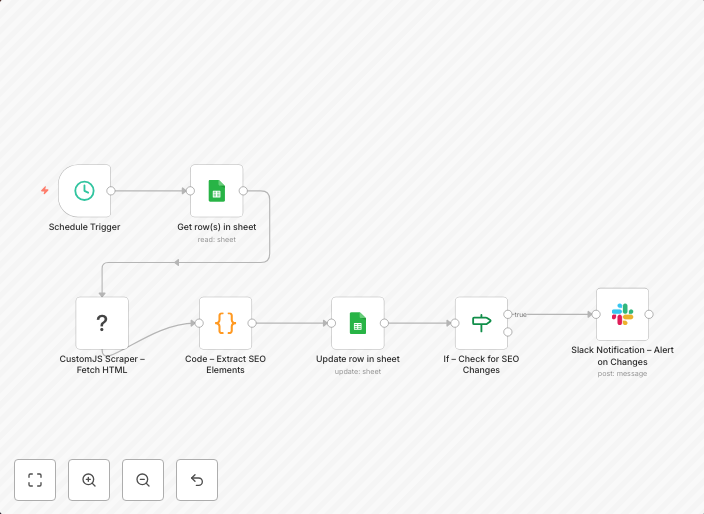
Monitor competitor SEO changes with CustomJS Scraper, Google Sheets & Slack alerts
> ⚠️ Notice: > Community nodes like @custom-js/n8n-nodes-pdf-toolkit can only be installed on self-hosted instances of n8n. Screenshot from 20250911...
Get This WorkflowAbout This Workflow
What This Workflow Does
This n8n automation workflow monitors competitor SEO changes by utilizing a CustomJS Scraper to extract data, storing it in Google Sheets for easy access and analysis. It also sends alerts to Slack when changes are detected, ensuring timely notifications and enabling swift action. With this workflow, you can stay on top of competitor SEO strategies and adjust your own marketing approach accordingly.
Who Should Use This
This workflow is ideal for marketers, business owners, and developers who want to stay competitive in the SEO landscape and make data-driven decisions. It's perfect for those who need to monitor their competitors' online presence and adapt their strategies to stay ahead.
Key Features
- Competitor SEO Monitoring: Extracts data from competitor websites using a CustomJS Scraper and stores it in Google Sheets for analysis.
- Real-time Alerts: Sends notifications to Slack when changes are detected, ensuring timely action and adjustments to your marketing strategy.
- Automated Data Storage: Stores competitor SEO data in Google Sheets, making it easily accessible and analyzable.
How to Get Started
To use this workflow, simply import it into your n8n instance, customize the nodes to fit your specific needs, and connect your Google Sheets and Slack accounts. Make sure to follow the instructions and guidelines provided by the author, Igor Fediczko, to ensure a seamless setup process.
Use This Workflow in n8n →Similar Workflows




Affiliate Disclosure: We may earn a commission if you sign up for n8n through our links. This doesn't affect our recommendations.