Nightly n8n backup to Dropbox
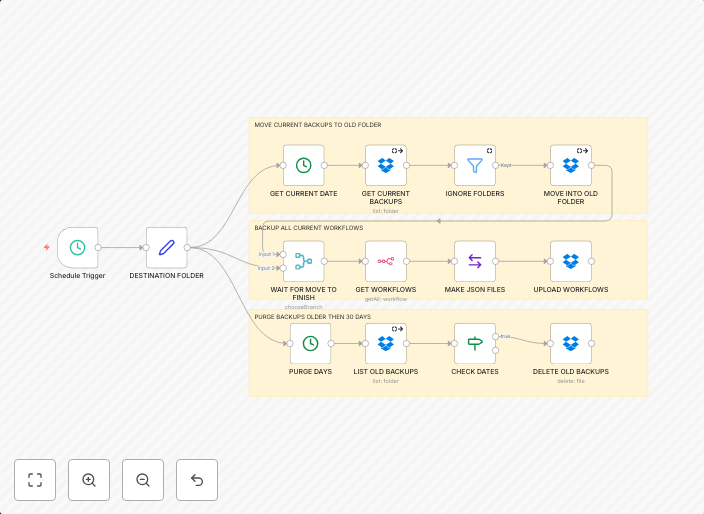
This template will create a nightly backup of all your n8n workflows to a Dropbox folder. Each night, the previous night's backups are moved into an "old"...
Get This WorkflowAbout This Workflow
What This Workflow Does
This template automates the nightly backup of all n8n workflows to a Dropbox folder for safekeeping and version control. Each night, the previous night's backups are moved into an "old" folder to maintain a clean and organized backup history. This ensures that your workflows are protected and easily retrievable in case of any issues or changes.
Who Should Use This
This workflow is ideal for developers, IT managers, and system administrators who want to establish a robust backup process for their n8n workflows, ensuring business continuity and compliance with data protection policies.
Key Features
- Automatic nightly backup of all n8n workflows
- Backup files are stored in a designated Dropbox folder
- Previous night's backups are moved to an "old" folder for easy archive management
- No manual intervention required for daily backups
How to Get Started
To use this template, import it into your n8n instance and configure the Dropbox integration by linking your Dropbox account. Customize the workflow settings to match your specific backup requirements and preferences.
Use This Workflow in n8n →Similar Workflows



Affiliate Disclosure: We may earn a commission if you sign up for n8n through our links. This doesn't affect our recommendations.