Parse incoming invoices from Outlook using AI Document Understanding
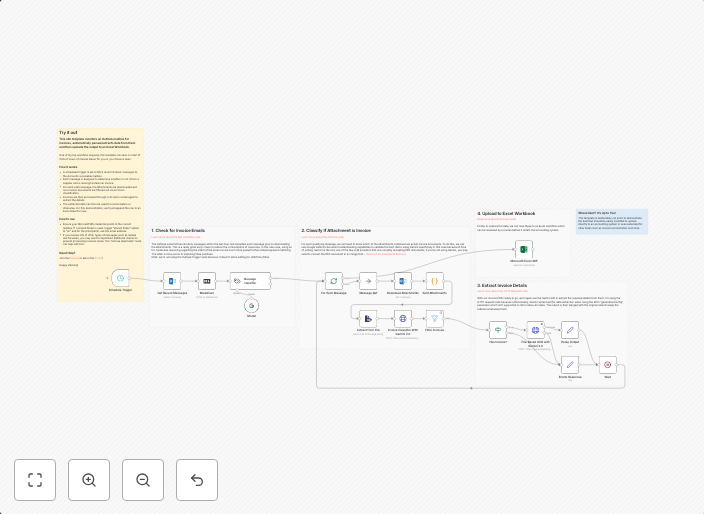
This n8n template monitors an Outlook mailbox for invoices, automatically parses/extracts data from them and then uploads the output to an Excel Workbook....
Get This WorkflowAbout This Workflow
What This Workflow Does
This n8n template automates the process of parsing incoming invoices from Outlook using AI-powered Document Understanding. It extracts data from the invoices and uploads the extracted information to an Excel Workbook, streamlining the invoice processing workflow. This automation simplifies the task of manually extracting and organizing invoice data, saving time and reducing the risk of human error.
Who Should Use This
This workflow is ideal for businesses and organizations that use Outlook for email and require efficient invoice processing. This includes accountants, finance teams, and business owners who handle a high volume of invoices and want to automate the data extraction and organization process.
Key Features
- Monitors an Outlook mailbox for incoming invoices and triggers the automation process
- Uses AI-powered Document Understanding to extract data from invoices
- Uploads the extracted data to an Excel Workbook for easy access and organization
- Automates the manual process of extracting and organizing invoice data, saving time and reducing errors
How to Get Started
To use this workflow, simply import it into your n8n account and adjust the settings to match your Outlook mailbox and Excel Workbook configurations. You can then customize the workflow to suit your specific needs and automate the process of parsing and uploading invoice data.
Use This Workflow in n8n →Similar Workflows




Affiliate Disclosure: We may earn a commission if you sign up for n8n through our links. This doesn't affect our recommendations.