Process documents with recursive chunking using Google Drive, OpenAI & Gemini RAG
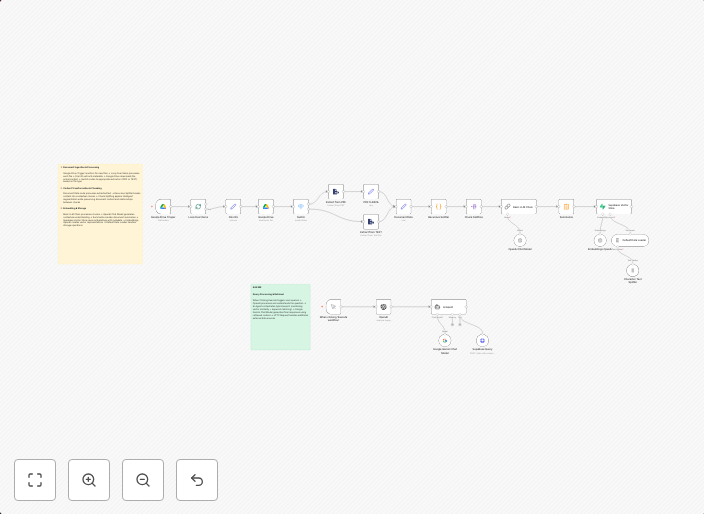
1. Document Ingestion & Processing Google Drive Trigger monitors for new files → Loop Over Items processes each file → File Info extracts metadata → Google...
Get This WorkflowAbout This Workflow
What This Workflow Does
This workflow automates the process of ingesting documents from Google Drive, processing them using OpenAI, and storing the results in Gemini RAG. It uses recursive chunking to handle large documents and metadata extraction for comprehensive data handling. The workflow enables efficient document processing and storage.
Who Should Use This
This workflow is suitable for developers, business owners, and teams who rely on document processing and AI-driven insights. It can be particularly useful for teams working with large documents and needing to extract valuable information.
Key Features
- Document Ingestion: Google Drive trigger monitors for new files and automatically imports them into the workflow.
- Recursive Chunking: The workflow processes large documents in manageable chunks, ensuring efficient processing.
- AI-driven Insights: OpenAI is used to extract valuable information and insights from the documents.
- Metadata Extraction: The workflow extracts metadata from each file using `File Info` node.
How to Get Started
To use this workflow, import it into your n8n instance and customize the Google Drive trigger to monitor the desired folder. Configure the OpenAI node with your API credentials and adjust the Gemini RAG node to match your storage preferences.
Use This Workflow in n8n →Similar Workflows




Affiliate Disclosure: We may earn a commission if you sign up for n8n through our links. This doesn't affect our recommendations.