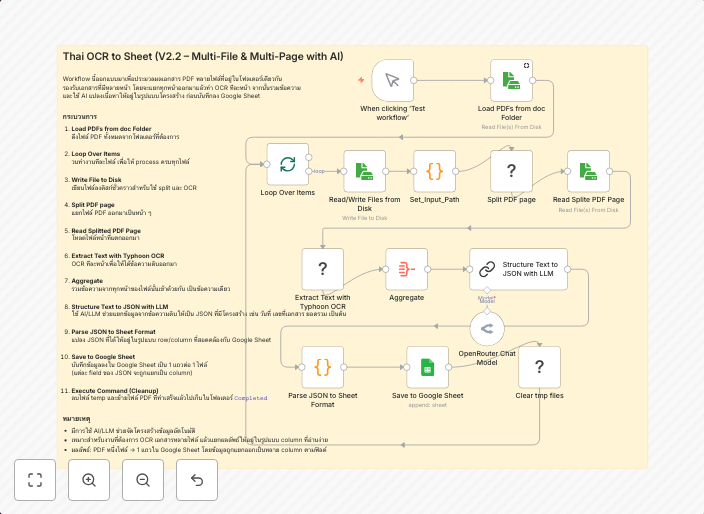
Process Thai documents with TyphoonOCR & AI to Google Sheets (multi-page PDF)
⚠️ Note: This template requires a community node and works only on self-hosted n8n installations. It uses the Typhoon OCR Python package, pdfseparate from...
Get This WorkflowAbout This Workflow
What This Workflow Does
This workflow automates the process of extracting text from Thai multi-page PDF documents using TyphoonOCR and AI, and then imports the extracted text into a Google Sheets spreadsheet. It can be used to streamline document processing and data entry tasks. The workflow is designed to handle PDF files in Thai language.
Who Should Use This
This workflow is ideal for developers, marketers, and business owners who need to process and analyze large volumes of Thai language documents, such as those in the finance, education, or government sectors.
Key Features
- Thai OCR: Uses TyphoonOCR to extract text from multi-page PDF documents in Thai language.
- Multi-page PDF support: Can handle PDF files with multiple pages.
- AI-assisted processing: Leverages AI to improve the accuracy of text extraction.
- Google Sheets integration: Imports the extracted text into a Google Sheets spreadsheet for further analysis.
How to Get Started
To use this workflow, import it into your self-hosted n8n installation and configure the TyphoonOCR and Google Sheets nodes to match your specific requirements, including API keys and document upload paths.
Use This Workflow in n8n →Similar Workflows




Affiliate Disclosure: We may earn a commission if you sign up for n8n through our links. This doesn't affect our recommendations.