Qualify high-budget leads: Typeform to HubSpot, Google Sheets & Slack alerts
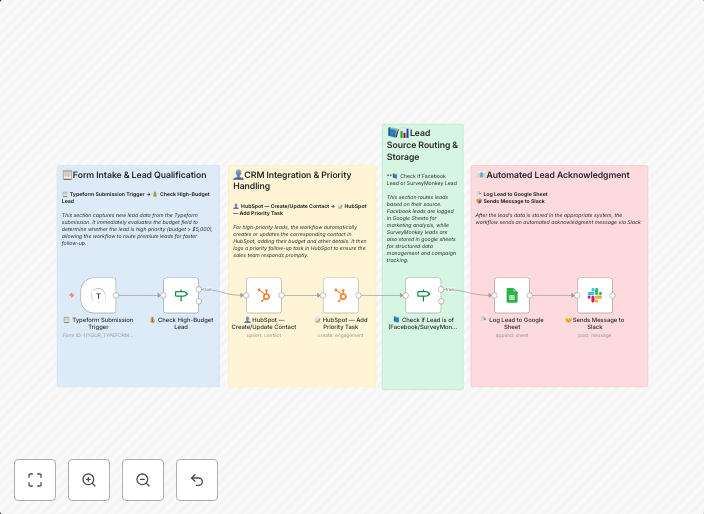
How it worksThis workflow captures new leads from Typeform, instantly checks if their budget is above $5,000, and prioritizes them for faster sales...
Get This WorkflowAbout This Workflow
What This Workflow Does
This workflow captures new leads from Typeform and instantly qualifies them based on their budget, sending high-budget leads to HubSpot for priority sales attention and updating Google Sheets with lead information. It also sends notifications to Slack for immediate team awareness.
Who Should Use This
This workflow is ideal for sales and marketing teams looking to streamline their lead qualification process and prioritize high-value leads for faster conversion.
Key Features
- Qualify high-budget leads: Instantly checks if new Typeform leads have a budget above $5,000 for priority sales attention.
- Update HubSpot: Sends qualified high-budget leads to HubSpot for faster sales follow-up.
- Track in Google Sheets: Updates Google Sheets with new lead information for ongoing tracking and analysis.
- Slack alerts: Sends notifications to your Slack channel for immediate team awareness of new high-budget leads.
How to Get Started
To use this workflow, simply import it into your n8n account and customize the Typeform and HubSpot credentials to match your specific setup. This workflow can be easily adapted to fit your business needs and processes.
Use This Workflow in n8n →Similar Workflows

Affiliate Disclosure: We may earn a commission if you sign up for n8n through our links. This doesn't affect our recommendations.