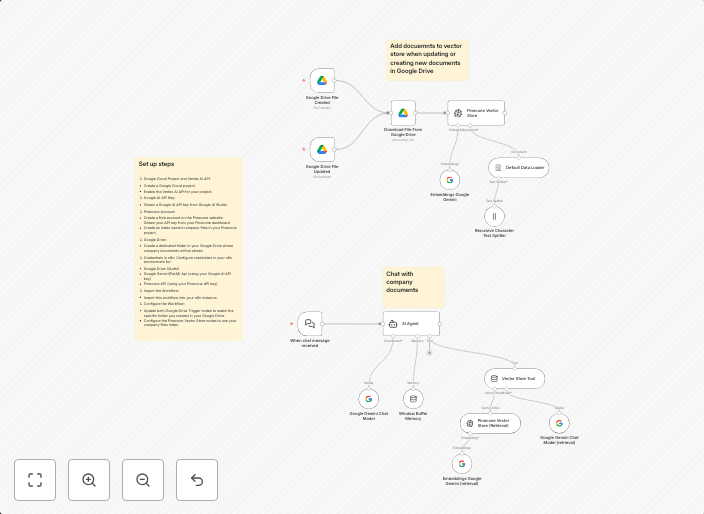
RAG chatbot for company documents using Google Drive and Gemini
This workflow implements a Retrieval Augmented Generation (RAG) chatbot that answers employee questions based on company documents stored in Google Drive....
Get This WorkflowAbout This Workflow
What This Workflow Does
This workflow creates a Retrieval Augmented Generation (RAG) chatbot that answers employee questions based on company documents stored in Google Drive, using the Gemini AI integration. It retrieves relevant information and generates responses to employee queries, enhancing knowledge sharing and collaboration. The workflow facilitates efficient access to company knowledge and supports employee onboarding, training, and problem-solving.
Who Should Use This
This workflow is ideal for organizations with a large library of company documents, looking to leverage AI-driven chatbots to improve employee knowledge sharing and collaboration. Developers, IT professionals, and knowledge managers can use this workflow to set up a RAG chatbot tailored to their company's needs.
Key Features
- Retrieves company document information from Google Drive using the Google Drive integration.
- Utilizes Gemini AI to generate responses to employee questions, providing accurate and relevant answers.
- Supports multiple input formats, including text and voice commands.
- Offers a customizable chatbot interface for seamless integration with existing collaboration tools.
How to Get Started
To use this workflow, simply import it into your n8n instance and customize the settings to fit your company's Google Drive and Gemini AI configurations. Follow the workflow's prompts to connect your accounts and set up the RAG chatbot to start answering employee questions.
Use This Workflow in n8n →Similar Workflows




Affiliate Disclosure: We may earn a commission if you sign up for n8n through our links. This doesn't affect our recommendations.