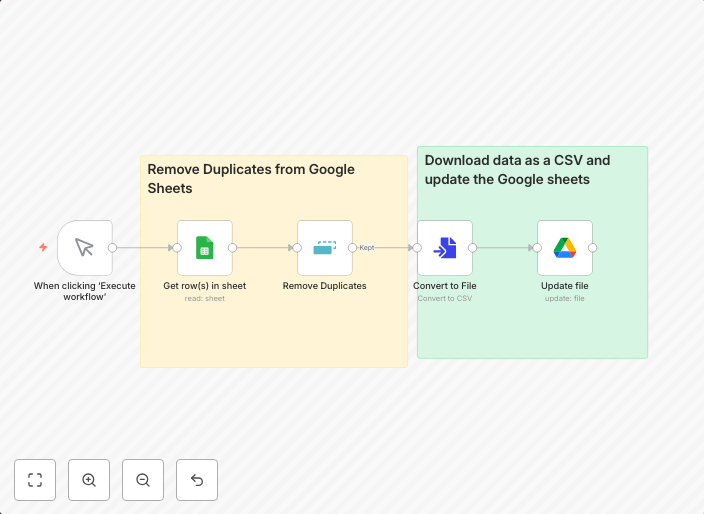
Remove duplicate entries & update Google Sheets based on profile URLs
Remove Duplicates & Update Google SheetsHow it Works This workflow helps you keep your Google Sheets clean and up-to-date by automatically removing...
Get This WorkflowAbout This Workflow
What This Workflow Does
This workflow is designed to remove duplicate entries and update a Google Sheet based on profile URLs. It helps maintain clean and up-to-date data in Google Sheets by automatically removing duplicate entries and adding new information. This saves time and reduces manual data management efforts.
Who Should Use This
This workflow is ideal for marketers, business owners, and developers who rely on Google Sheets for data management, lead generation, or document extraction. It's perfect for those who want to streamline their data entry process and reduce errors caused by duplicate entries.
Key Features
- Removes duplicate entries from the Google Sheets data
- Updates Google Sheets with new information based on profile URLs
- Integrates with Google Sheets for data storage and management
- Automates data management, saving time and reducing manual errors
How to Get Started
To start using this workflow, simply import it into your n8n account and customize it to fit your specific needs by connecting your Google Sheets account and adjusting the workflow settings as required.
Use This Workflow in n8n →Similar Workflows




Affiliate Disclosure: We may earn a commission if you sign up for n8n through our links. This doesn't affect our recommendations.