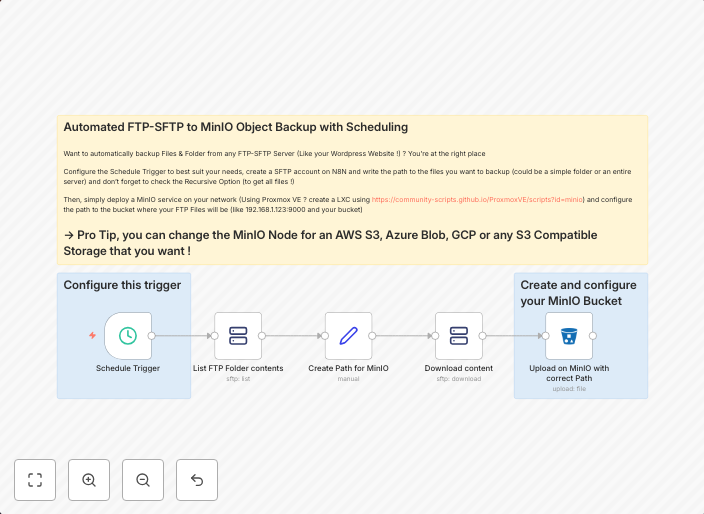
Scheduled FTP/SFTP to MinIO backup with preserved folder structure
Automated FTP/SFTP to MinIO Object Backup with Scheduling $\mapsto$ Can work with FTP/SFTP Servers like your Wordpress Website ! What this workflow does ?...
Get This WorkflowAbout This Workflow
What This Workflow Does
This workflow automates the process of backing up files from an FTP/SFTP server to MinIO, preserving the original folder structure. It ensures that your files are safely stored in MinIO, allowing for easy recovery in case of data loss or corruption. The workflow can be scheduled to run at regular intervals, ensuring that your backups are up-to-date.
Who Should Use This
This workflow is ideal for developers, marketers, and business owners who rely on FTP/SFTP servers for data storage and need a reliable backup solution to prevent data loss. Whether you're managing a WordPress website or other FTP/SFTP servers, this workflow can help you maintain a secure backup of your files.
Key Features
- Scheduled backups: The workflow can be set to run at regular intervals, ensuring that your backups are up-to-date.
- Preserves folder structure: The original folder structure is maintained during the backup process, making it easy to recover specific files or folders.
- Supports FTP/SFTP servers: The workflow can work with various FTP/SFTP servers, including those used by WordPress websites.
- Integrates with MinIO: The workflow seamlessly integrates with MinIO, allowing for secure and efficient storage of your backed-up files.
How to Get Started
To use this workflow, simply import it into your n8n instance and customize the settings to match your FTP/SFTP server and MinIO credentials. Follow the workflow's instructions to schedule your backups and ensure that your files are safely stored in MinIO.
Use This Workflow in n8n →Similar Workflows




Affiliate Disclosure: We may earn a commission if you sign up for n8n through our links. This doesn't affect our recommendations.