Score LinkedIn leads against your ICP with Google Sheets, SourceGeek and Gemini
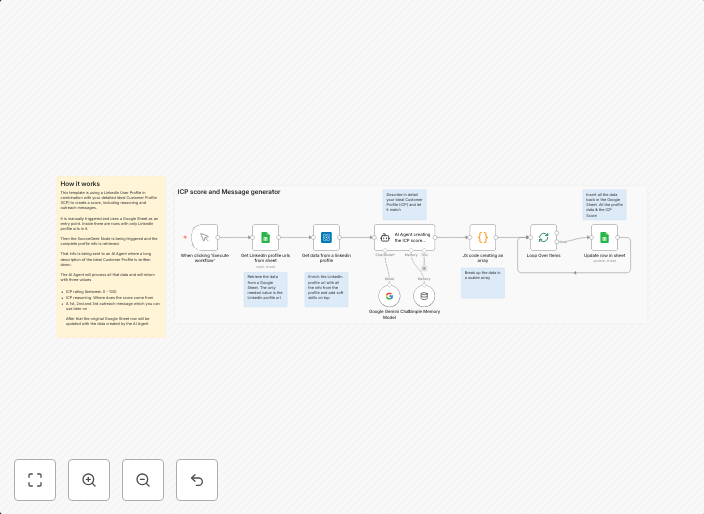
How it worksThis template is using a LinkedIn User Profile in combination with your detailed Ideal Customer Profile (ICP) to create a score, including...
Get This WorkflowAbout This Workflow
What This Workflow Does
This workflow automates the process of scoring LinkedIn leads against an Ideal Customer Profile (ICP) using Google Sheets, SourceGeek, and Gemini. It analyzes user profiles and generates a score based on the ICP criteria. This allows you to prioritize and focus on the most promising leads.
Who Should Use This
This workflow is suitable for marketers, sales teams, and business owners who use LinkedIn for lead generation and want to optimize their outreach efforts. It's ideal for anyone who wants to streamline their lead scoring process and improve conversion rates.
Key Features
- ICP-based lead scoring: The workflow uses a LinkedIn User Profile and an Ideal Customer Profile (ICP) to generate a score.
- Google Sheets integration: The score is calculated and stored in a Google Sheet for easy tracking and analysis.
- SourceGeek and Gemini integration: The workflow uses these tools to enrich lead data and provide more accurate scoring.
- Automated lead prioritization: The workflow helps prioritize leads based on their score, ensuring that the most promising ones receive attention first.
Similar Workflows




Affiliate Disclosure: We may earn a commission if you sign up for n8n through our links. This doesn't affect our recommendations.