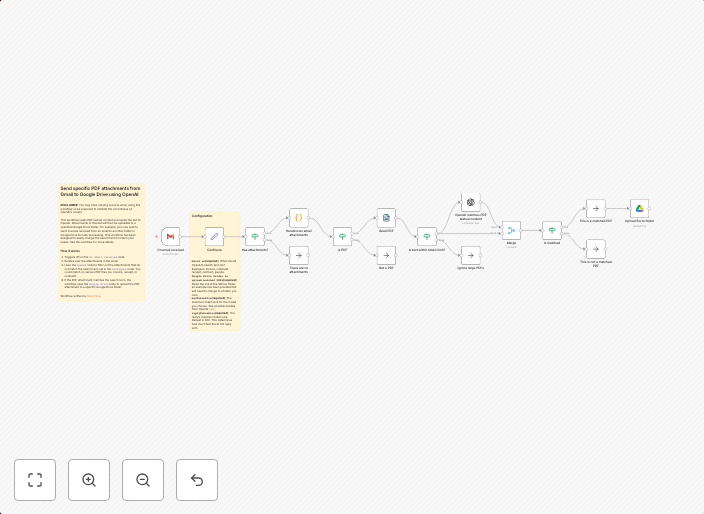
Send specific PDF attachments from Gmail to Google Drive using OpenAI
This workflow reads PDF textual content and sends the text to OpenAI. Attachments of interest will then be uploaded to a specified Google Drive folder. For...
Get This WorkflowAbout This Workflow
What This Workflow Does
This workflow automates the process of identifying specific PDF attachments from Gmail, analyzing their textual content using OpenAI, and uploading relevant attachments to a designated Google Drive folder. It streamlines the process of organizing and summarizing PDF documents, making it easier to manage and retrieve important information. By leveraging AI-powered analysis, this workflow enhances productivity and efficiency.
Who Should Use This
This workflow is ideal for developers, marketers, and business owners who frequently receive and manage large volumes of PDF documents, such as sales teams, research analysts, or customer support specialists. They can utilize this automation to save time and improve their workflow efficiency.
Key Features
- PDF Attachment Identification: Automatically identifies specific PDF attachments from Gmail and extracts their textual content.
- OpenAI Analysis: Leverages OpenAI to analyze the textual content of PDF attachments, providing a summarized version of the document.
- Google Drive Upload: Uploads relevant PDF attachments to a specified Google Drive folder for easy access and organization.
- Customizable: Allows users to customize the workflow by setting their own criteria for identifying and uploading PDF attachments.
How to Get Started
To get started with this workflow, simply import it into your n8n account and customize the settings to match your specific requirements, such as adjusting the Google Drive folder and OpenAI API credentials.
Use This Workflow in n8n →Similar Workflows




Affiliate Disclosure: We may earn a commission if you sign up for n8n through our links. This doesn't affect our recommendations.