Smart shipping prioritization with Google Gemini and Google Sheets
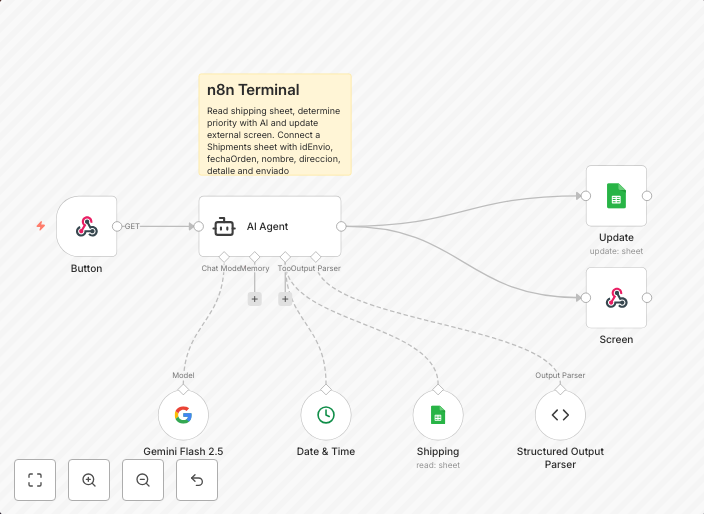
How it worksThis template waits for an external button to be pressed via webhook, then reads a Google Sheet with pending shipments. The sheet contains the...
Get This WorkflowAbout This Workflow
What This Workflow Does
This workflow prioritizes shipping by automating tasks and leveraging Google Gemini and Google Sheets. It waits for an external button press via webhook, then reads a Google Sheet with pending shipments to optimize the shipping process. The automation streamlines tasks and provides real-time data for informed decision-making.
Who Should Use This
This workflow is ideal for e-commerce businesses, logistics companies, and shipping operators who want to streamline their shipping processes, reduce manual labor, and make data-driven decisions.
Key Features
- Waits for an external button press via webhook to trigger the automation process
- Reads a Google Sheet with pending shipments and extracts relevant data
- Leverages Google Gemini for AI-powered document extraction and analysis
- Provides real-time data for informed decision-making and optimized shipping prioritization
How to Get Started
To start using this workflow, import it into n8n and customize the settings to match your Google Sheet and Google Gemini integrations. This will enable you to automate your shipping prioritization process and start benefiting from real-time data and optimized decision-making.
Use This Workflow in n8n →Similar Workflows




Affiliate Disclosure: We may earn a commission if you sign up for n8n through our links. This doesn't affect our recommendations.