Summarize Google Docs & PDFs with GPT-4 and send to Slack or email
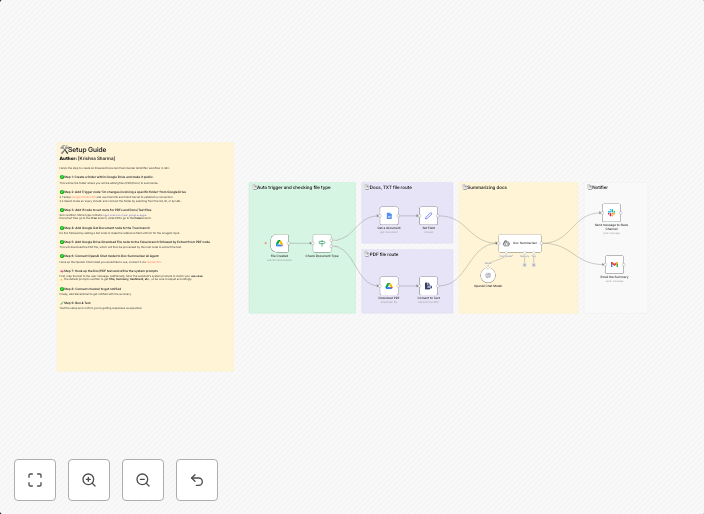
📄 AI-Powered Document Summarizer & Notifier This workflow monitors a Google Drive folder for new files (Google Docs or PDFs), extracts text, summarizes...
Get This WorkflowAbout This Workflow
What This Workflow Does
This workflow automates the process of summarizing new Google Docs and PDF files from a specified Google Drive folder using GPT-4 AI technology. It extracts text from these files, generates a summary, and then sends the summary to a chosen recipient via Slack or email. This workflow streamlines document analysis and notification, saving time and effort.
Who Should Use This
This workflow is ideal for developers, marketers, and business owners who need to stay on top of numerous documents, reports, or research papers. It's also suitable for teams that rely on Google Drive for collaboration and want to automate the summarization and notification process.
Key Features
- Monitor Google Drive folder: Keeps an eye on a designated Google Drive folder for new files.
- AI-powered summarization: Uses GPT-4 to extract text and generate a summary from Google Docs and PDFs.
- Flexible notification options: Sends the summary to a chosen recipient via Slack or email.
- Automated document analysis: Saves time by automating the process of reading and summarizing documents.
How to Get Started
To use this workflow, simply import it into your n8n instance and customize the settings to match your specific requirements, such as selecting the folder to monitor, choosing the notification method, and configuring the email or Slack recipient.
Use This Workflow in n8n →Similar Workflows




Affiliate Disclosure: We may earn a commission if you sign up for n8n through our links. This doesn't affect our recommendations.