Sync data between Google Drive and AWS S3
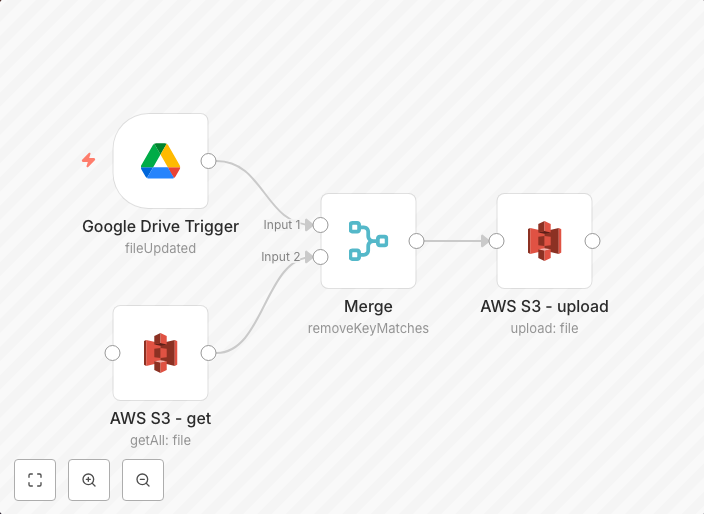
This workflow synchronizes files one-way from Google Drive to AWS S3. workflow-screenshot Google Drive Trigger node triggers the workflow when a new file is...
Get This WorkflowAbout This Workflow
What This Workflow Does
This workflow automates the synchronization of new files from Google Drive to AWS S3, providing a seamless and efficient way to store and manage files in the cloud. By leveraging this workflow, users can ensure that files are consistently up-to-date across both platforms. This reduces the risk of data inconsistencies and streamlines file management processes.
Who Should Use This
This workflow is ideal for developers, business owners, and IT professionals who manage files and data across multiple cloud platforms, such as Google Drive and AWS S3. It is particularly useful for those who need to synchronize files one-way from Google Drive to AWS S3.
Key Features
- One-way synchronization: Files are automatically copied from Google Drive to AWS S3, ensuring that data is consistently updated across both platforms.
- Google Drive trigger: The workflow is triggered whenever a new file is uploaded to Google Drive, allowing for real-time synchronization.
- AWS S3 file management: The workflow enables users to manage their files in AWS S3, including uploading, updating, and deleting files if necessary.
How to Get Started
To use this workflow, simply import it into your n8n account and customize the settings to match your specific Google Drive and AWS S3 configurations. From there, the workflow will automatically synchronize new files from Google Drive to AWS S3, streamlining your file management processes.
Use This Workflow in n8n →Similar Workflows

Affiliate Disclosure: We may earn a commission if you sign up for n8n through our links. This doesn't affect our recommendations.