Sync Monday.com items to Jira with smart duplicate detection & feedback loop
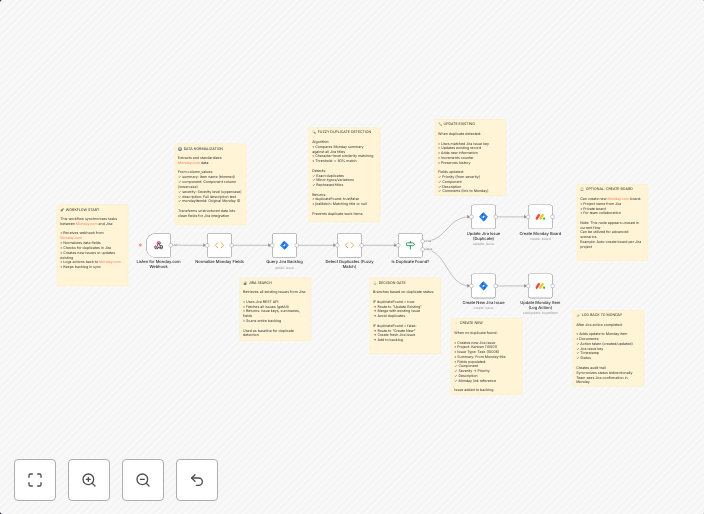
Description:Bridge the gap between Monday.com and Jira with this intelligent n8n automation template. The workflow listens for new or updated Monday.com...
Get This WorkflowAbout This Workflow
What This Workflow Does
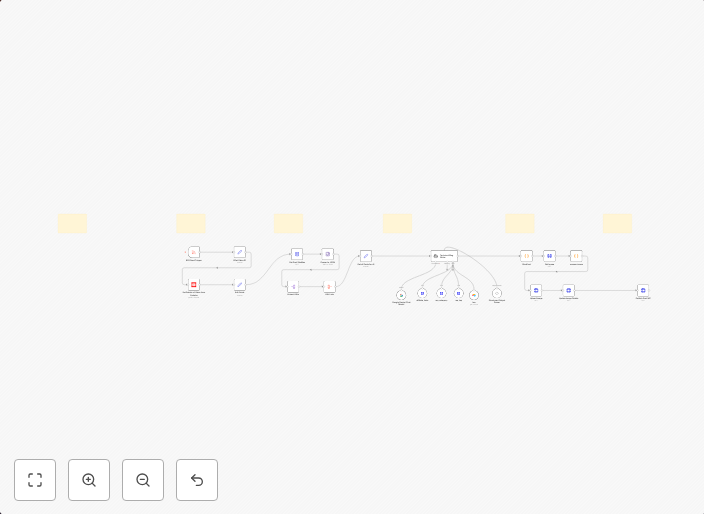
This workflow integrates Monday.com and Jira, automating the synchronization of items between the two platforms. It detects new or updated items in Monday.com and creates or updates corresponding items in Jira, with a smart duplicate detection feature to prevent unnecessary updates. The feedback loop also ensures that changes made in Jira are reflected back in Monday.com.
Who Should Use This
This workflow is ideal for project managers, developers, and business owners who use both Monday.com and Jira to manage projects and collaborate with teams. It streamlines workflows and helps maintain data consistency across platforms.
Key Features
- Smart Duplicate Detection: The workflow checks for existing items in Jira before creating or updating new ones, preventing unnecessary updates and maintaining data integrity.
- Feedback Loop: Changes made in Jira are reflected back in Monday.com, ensuring that data is consistent across both platforms.
- Automated Synchronization: New or updated items in Monday.com trigger the creation or update of corresponding items in Jira, saving time and effort.
- Real-time Integration: The workflow provides real-time integration between Monday.com and Jira, allowing teams to work seamlessly across both platforms.
How to Get Started
To use this workflow, import it into your n8n account and customize the settings to match your specific Monday.com and Jira integrations. You can then set up triggers and workflows to automate the synchronization of items between the two platforms.
Use This Workflow in n8n →Similar Workflows
Affiliate Disclosure: We may earn a commission if you sign up for n8n through our links. This doesn't affect our recommendations.