Sync new files from Google Drive with Airtable
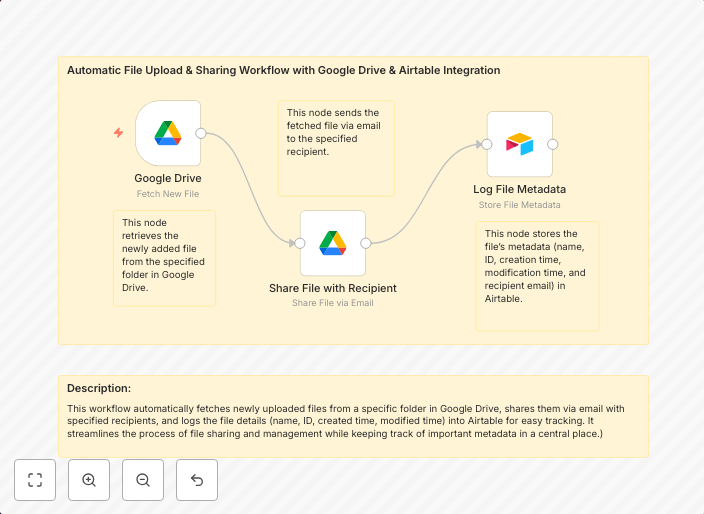
This workflow automatically fetches newly uploaded files from a specific folder in Google Drive, shares them via email with specified recipients, and logs...
Get This WorkflowAbout This Workflow
What This Workflow Does
This workflow automates the process of fetching newly uploaded files from a specific folder in Google Drive, sharing them with specified recipients via email, and logging the activity for record-keeping purposes. It helps streamline file management by reducing manual efforts and making it easier to share new files with relevant teams or stakeholders. By using this workflow, users can stay on top of new file uploads and ensure that important information is shared efficiently.
Who Should Use This
This workflow is ideal for business owners, marketers, and developers who manage files and need to share new uploads with specific teams or stakeholders. It's particularly useful for companies that rely heavily on Google Drive for file storage and collaboration.
Key Features
- Fetches new files from Google Drive: This workflow automatically detects and fetches newly uploaded files from a specified folder in Google Drive.
- Shares files via email: The workflow shares the new files with specified recipients via email, ensuring that relevant teams or stakeholders receive the latest information.
- Logs activity: The workflow logs the activity of new file uploads, providing a record-keeping system for easy reference and auditing purposes.
How to Get Started
To use this workflow, import it into your n8n instance and customize the settings to match your specific Google Drive folder and email sharing requirements. From there, you can set up the workflow to run automatically, ensuring seamless and efficient file management.
Use This Workflow in n8n →Similar Workflows




Affiliate Disclosure: We may earn a commission if you sign up for n8n through our links. This doesn't affect our recommendations.