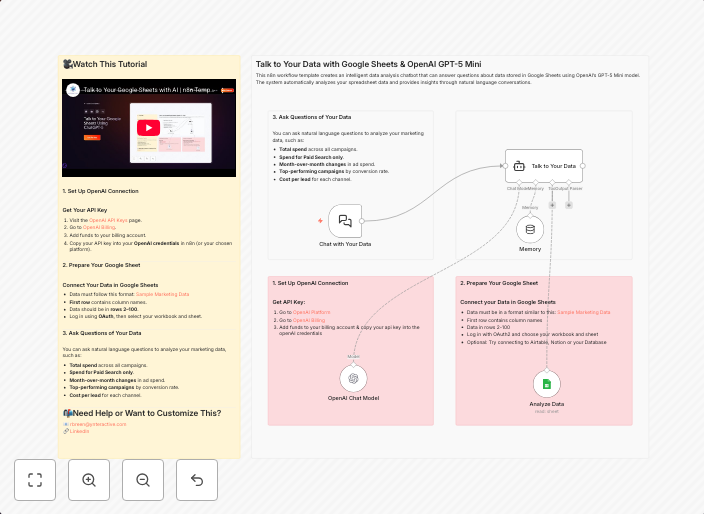
Talk to your Google Sheets using ChatGPT-5
This n8n workflow template creates an intelligent data analysis chatbot that can answer questions about data stored in Google Sheets using OpenAI's GPT-5...
Get This WorkflowAbout This Workflow
What This Workflow Does
This n8n workflow template enables users to create an intelligent data analysis chatbot that uses OpenAI's GPT-5 to answer questions about data stored in Google Sheets. The workflow automates the process of querying data, generating responses, and providing insights to users through a conversational interface. By leveraging the power of AI and Google Sheets integration, this workflow simplifies data analysis and decision-making.
Who Should Use This
This workflow is ideal for developers, marketers, and business owners who need to analyze and understand their Google Sheets data in a more interactive and user-friendly way. It is particularly useful for those who want to extract valuable insights and make data-driven decisions without requiring extensive data analysis expertise.
Key Features
- Conversational Interface: Answer questions about Google Sheets data using a chatbot interface powered by OpenAI's GPT-5.
- Data Analysis Automation: Automate data analysis and extraction tasks, saving time and effort.
- AI-Driven Insights: Leverage the power of AI to generate insights and recommendations based on Google Sheets data.
- Integration with Google Sheets: Seamlessly connect to Google Sheets data to query, analyze, and visualize insights.
How to Get Started
To use this workflow, simply import it into your n8n environment, customize the settings to connect to your Google Sheets account, and start asking questions to your new chatbot. With minimal setup, you can begin analyzing and understanding your data like never before.
Use This Workflow in n8n →Similar Workflows




Affiliate Disclosure: We may earn a commission if you sign up for n8n through our links. This doesn't affect our recommendations.