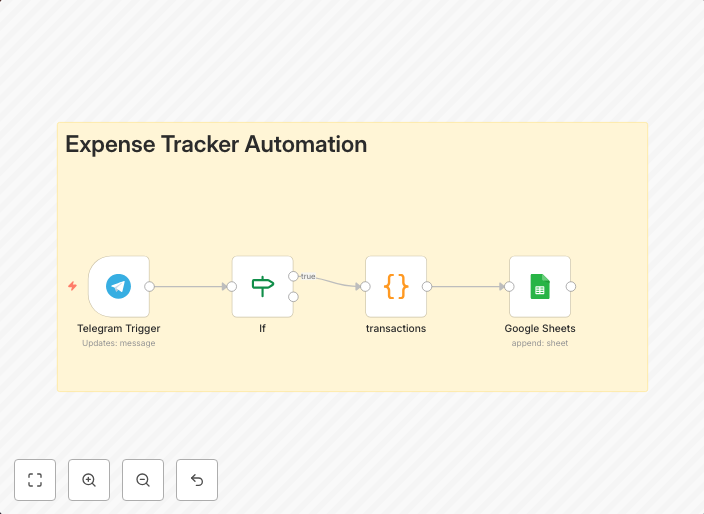
Track expenses by parsing Telegram transaction messages to Google Sheets
Overview This n8n workflow template automatically parses incoming Telegram transaction messages and logs structured data into a Google Sheet. It’s designed...
Get This WorkflowAbout This Workflow
Track expenses by parsing Telegram transaction messages to Google Sheets
This n8n workflow template automatically parses incoming Telegram transaction messages and logs structured data into a Google Sheet, allowing for easy expense tracking.
What This Workflow Does
This workflow retrieves text messages from Telegram, extracts relevant transaction information (amount, date, description), and stores it in a structured format in a Google Sheet. The automation enables users to easily track their expenses and make informed financial decisions.
Who Should Use This
This workflow is ideal for individuals and small business owners who rely on Telegram for transaction updates and want to streamline their expense tracking process.
Key Features
- Telegram Message Parsing: Retrieves text messages from Telegram, extracting transaction information such as amount, date, and description.
- Structured Data Storage: Logs extracted data in a structured format within a Google Sheet.
- Automated Expense Tracking: Enables users to easily track and analyze their expenses without manual data entry.
How to Get Started
To use this workflow, simply import it into your n8n account, connect your Telegram and Google account, and map the Telegram message text to the desired fields in the Google Sheet. Customize the workflow to fit your specific expense tracking needs.
Use This Workflow in n8n →Similar Workflows




Affiliate Disclosure: We may earn a commission if you sign up for n8n through our links. This doesn't affect our recommendations.