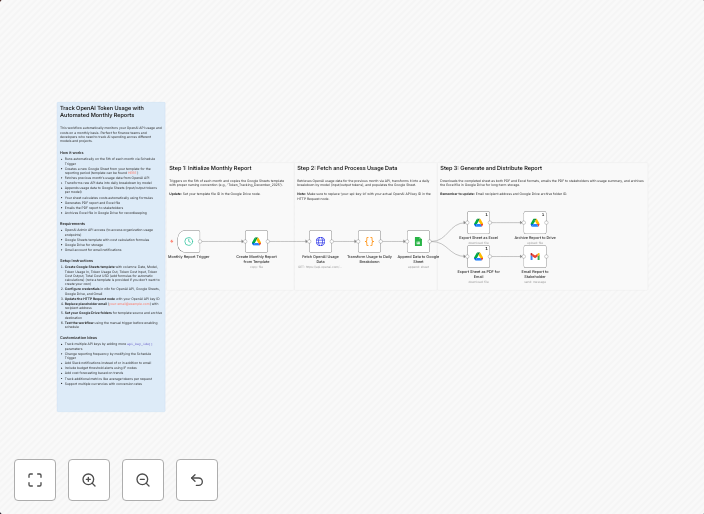
Track monthly OpenAI token usage with Google Sheets and Gmail reports
Who's this forFinance teams, AI developers, product managers, and business owners who need to monitor and control OpenAI API costs across different models...
Get This WorkflowAbout This Workflow
Track monthly OpenAI token usage with Google Sheets and Gmail reports
This workflow automates the process of tracking monthly OpenAI token usage by extracting data from Gmail reports and sending it to a Google Sheets document for easy monitoring and analysis. It helps finance teams and AI developers to stay on top of their costs by providing a clear overview of token usage across different models. By doing so, users can make informed decisions to control and optimize their spending on OpenAI APIs.
This workflow is ideal for finance teams, AI developers, product managers, and business owners who need to monitor and control OpenAI API costs across different models.
- Extracts data from Gmail reports: Automatically extracts relevant data from Gmail reports, such as OpenAI token usage and costs.
- Sends data to Google Sheets: Sends the extracted data to a designated Google Sheets document for easy monitoring and analysis.
- Tracks monthly usage: Tracks and analyzes monthly OpenAI token usage across different models.
- Provides cost control insights: Offers valuable insights to help users control and optimize their spending on OpenAI APIs.
To use this workflow, simply import it into your n8n account and customize the settings to match your specific requirements, such as connecting your Gmail and Google Sheets accounts.
Use This Workflow in n8n →Similar Workflows




Affiliate Disclosure: We may earn a commission if you sign up for n8n through our links. This doesn't affect our recommendations.