Track SDK documentation drift with GitHub, Notion, Google Sheets, and Slack
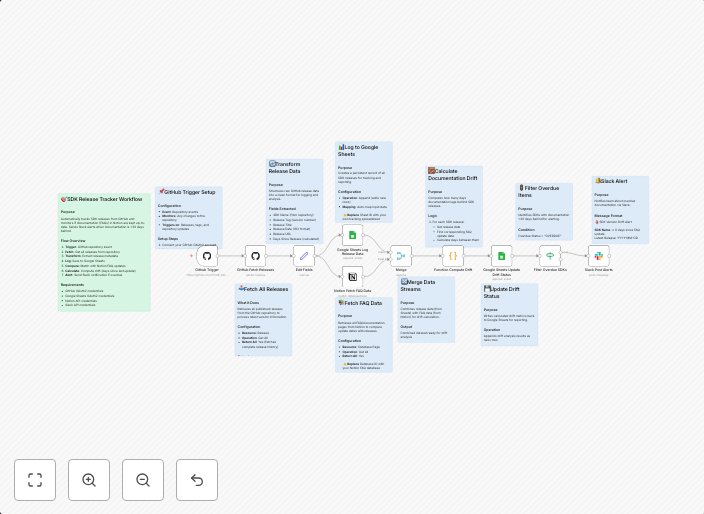
📊 DescriptionAutomatically track SDK releases from GitHub, compare documentation freshness in Notion, and send Slack alerts when docs lag behind. This...
Get This WorkflowAbout This Workflow
What This Workflow Does
This workflow automates the tracking of SDK documentation drift by connecting GitHub, Notion, Google Sheets, and Slack. It monitors SDK releases, compares documentation freshness, and sends alerts via Slack when documentation lags behind. This ensures that documentation remains up-to-date and aligns with SDK releases.
Who Should Use This
This workflow is ideal for developers, engineering teams, and project managers who need to maintain accurate and up-to-date documentation for their software development kits (SDKs). It helps ensure that documentation is synchronized with SDK releases, reducing confusion and errors.
Key Features
- SDK Release Monitoring: Tracks new SDK releases from GitHub and updates a corresponding Google Sheet.
- Documentation Comparison: Compares the freshness of documentation in Notion against the latest SDK releases, highlighting any discrepancies.
- Slack Alerts: Sends notifications to team members and stakeholders via Slack when documentation lags behind, ensuring prompt attention and updates.
How to Get Started
To use this workflow, import it into n8n and customize the GitHub, Notion, Google Sheets, and Slack connections to match your specific setup and requirements. Adjust the workflow settings to fit your team's needs and documentation workflow.
Use This Workflow in n8n →Similar Workflows

Affiliate Disclosure: We may earn a commission if you sign up for n8n through our links. This doesn't affect our recommendations.