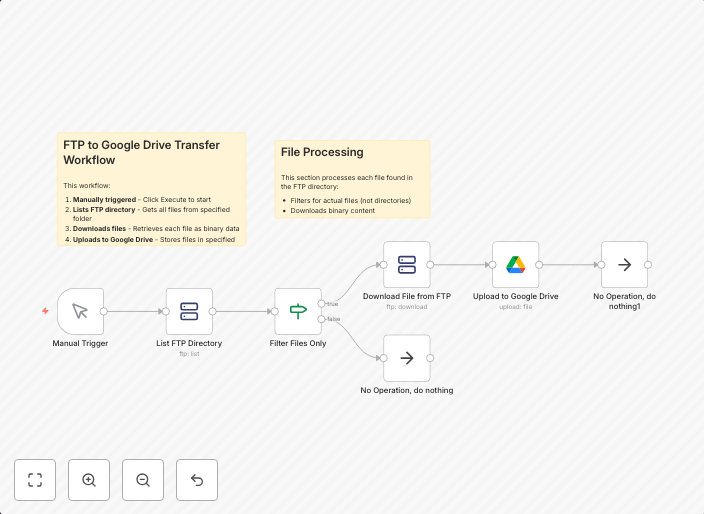
Transfer files from FTP server to Google Drive
FTP to Google Drive Transfer Template What This Template Does This workflow automatically transfers files from an FTP server to Google Drive. It's perfect...
Get This WorkflowAbout This Workflow
What This Workflow Does
This workflow automates the transfer of files from an FTP server to Google Drive, providing a seamless and efficient way to synchronize your files across different storage systems.
Who Should Use This
Developers, administrators, and business owners who need to regularly transfer files between an FTP server and Google Drive can benefit from this workflow.
Key Features
- Automated File Transfer: The workflow transfers files from the FTP server to Google Drive on a schedule you define.
- Real-time Monitoring: You can monitor the transfer process and receive notifications if any issues arise.
- Customizable: You can customize the workflow to transfer specific file types, folders, or directories from the FTP server to Google Drive.
How to Get Started
To use this workflow, import it into your n8n account and customize the FTP and Google Drive credentials to match your specific setup. You can then configure the workflow to run automatically on a schedule or manually as needed.
Use This Workflow in n8n →Similar Workflows



Affiliate Disclosure: We may earn a commission if you sign up for n8n through our links. This doesn't affect our recommendations.